The Stack

ATTENTION:
The stack can be a challenging concept to grasp. Try to relax your preconceptions for this section. Many concepts presented here may be new or counter-intuitive.
What is the Stack?
The stack is a linear data structure that follows a strict order in which operations are performed. It may help to think of the stack as a structure that tracks the operation to run next as well as previous operations as needed (to allow for returns and such).
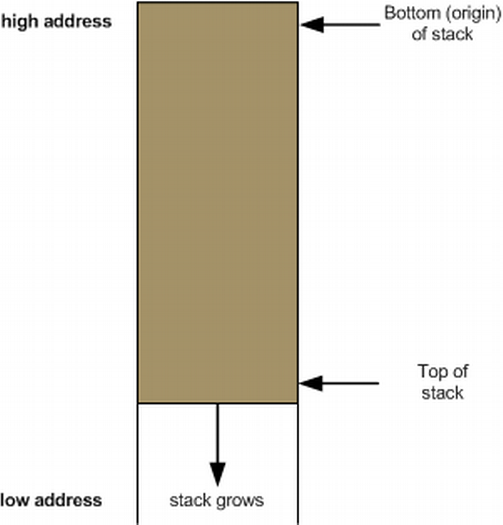
- The stack grows from high memory addresses to low memory addresses
- When looking at a stack graphic, the top of the photo is the bottom of the stack (higher addresses), in which the stack grows down into lower addresses.
- The current function typically exists within a stack "frame" (but now always).
Stack Frames
A stack frame is a related piece of data that gets pushed onto the greater stack. A stack frame often represents a function call and it's argument data. We will be getting into much more detail in chapter 3 about how the stack frame works.
Registers
- Stack Pointer - RSP (or ESP) points to the top of the stack
- Base Pointer - RBP (or EBP) points to the "base" of the stack frame
- The base pointer is a location we use as reference to grab arguments and locals.
Stack Frame Layout
| ADDRESS | VALUE/REG |
|---|---|
| 0x0018 | RBP |
| 0x0010 | 0x0000 |
| 0x0008 | 0x0000 |
| 0x0000 | RSP |
Let's break it down further...
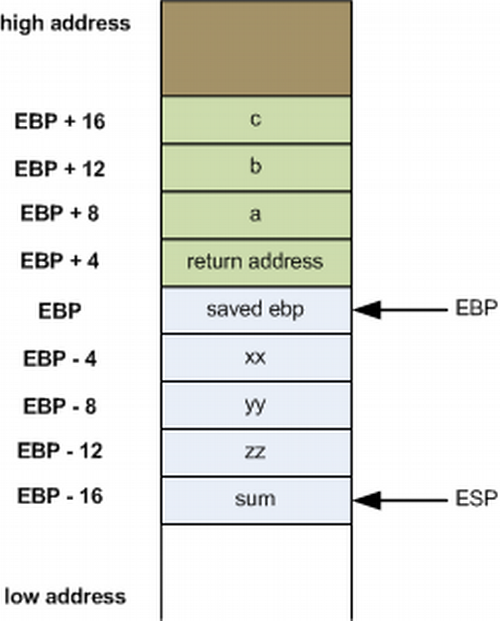
- The green represents function parameters
- The blue represents local variables
- The base pointer separates this for us, giving us a point in the stack frame to offset from in order to grab variables
- When working on a stack, the return address will always be EBP + 4
- On 64-bit architecture, we can actually access data with RSP and free up RBP as a general register. Though much more reliable than it's implementation in other architectures... it's still very hard to use. So for our purposes, we will be learning how to access data with RBP. And because it's the most common way to still do it.
- As we continue to modify the stack, RSP/ESP will always be moving.
Expanding the Stack Frame
We can modify the value of the RSP directly to allocate more stack space:
sub rsp, 16
But you must always ensure you clean up before the function returns:
add rsp, 16
In other words, what you take... you must give back
Stack Alignment
- x86_64 expects 16 byte stack alignment
- Allocating odd amounts of space can cause things to break
- Always make sure you clean up your stack before returning.
GDB - Stack Frames
- Examining the Call Stack (backtrace/bt)
- Frames and Information
- frame || f - Get information about the current frame
- info args - Get information about function arguments
- info locals - Get information about local variables
New Instructions: Push and Pop
-
Description:
- Push will subtract a pointer-width amount of space from RSP, and place the argument in the newly-allocated location. Pop performs the opposite action, storing the value just below RSP in the register provided, and adding a pointer-width amount to RSP. For every push, you will need to pop! It is important to pop in the opposite order in which you pushed.
-
Basic Use:
.first_func
    mov rax, 1
    mov rdx, 10

    push rax
    push rdx

    ; perform operations here

    pop rdx
    pop rax
Growing the Stack
- After a push operation:
| ADDRESS | VALUE/REG |
|---|---|
| 0x0028 | RBP |
| 0x0020 | 0x0000 |
| 0x0018 | 0x0000 |
| 0x0010 | 0x0000 |
| 0x0008 | Old RSP/Pushed Arg |
| 0x0000 | New RSP |
Restoring the Stack
- After a pop operation:
| ADDRESS | VALUE/REG |
|---|---|
| 0x0028 | RBP |
| 0x0020 | 0x0000 |
| 0x0018 | 0x0000 |
| 0x0010 | 0x0000 |
| 0x0008 | RSP |
| 0x0000 | Old RSP/Popped Arg |
Complete Performance Lab 4