Assembly Data Types and GDB Part 2
- When we think "data types", we need to understand that in Assembly, it's a different concept than in higher level languages. Typically in Assembly, data types are just bytes in a buffer. "Data type" is just an interpretation that's differentiated by size, alignment and certain bits being set.
- Some operations preserve special properties in a given data set (such as sign, e.g. (+/-))
- Other operations may expect different alignments in data, or may have issues with certain values (like floating points)
X86(_64) General Data Sizes
- Byte - smallest addressable unit (8 bit)
- Word - 2 bytes
- Dword - double word (4 bytes - x86 pointer width)
- Qword - quad word (8 bytes - x64 pointer width)
GDB: Examining Memory
- We can use GDB to examine various places in memory "x" (for "eXamine")
- x has several options:
- x/nfu - where n is the Number of things to examine, f is the Format and u is the Unit size
- x addr - examines the memory address typed in by the user
- x $
- examines the memory address pointed to by the register
GDB Formatting
- The "f" in x/nfu stands for formatting as we stated above
- Format options include:
- s - For a NULL-terminated string
- i - For a machine instruction
- x - for a hexadecimal (the default, which changes when x is used)
- For example: Disassembling at RIP
(gdb) x/i $rip
GDB Unit Sizes
- The "u" in x/nfu stands for Unit Size as we stated above
- Unit size options are a bit confusing in the context of x86/(_64) assembly and include:
- b - bytes
- h - halfwords (equivalent to "word" in x86(_64) asm; e.g., 2 bytes)
- w - words (4 bytes, equivalent to dwords)
- g - giant words (8 bytes, equivalent to qwords)
Sub Registers
- Sub-registers are a part of the bigger "parent" register
- Unless special instructions (not yet mentioned) are used, will not modify data in the other portions of the register when used.
| 64bit | 32bit | 16bit | 8bit high/low |
|---|---|---|---|
| rax | eax | ax | ah/al |
| rcx | ecx | cx | ch/cl |
| rdx | edx | dx | dh/dl |
| rdi | edi | N/A | N/A |
| rsi | esi | N/A | N/A |
Memory/Register Access - mov
- When accessing memory, the amount of data to copy can be specified:
mov al, byte [rsi]      ; copy a single byte
mov eax, dword [rcx]    ; copy a dword (4 bytes)
mov rax, qword [rsi]    ; copy a qword (8 bytes)
Notice the register/sub-registers used? They match the size of data we are copying.
- Also, data can be copied from sub-register to sub-register:
mov al, cl      ; copy from cl to al
xchg al, ah      ; exchange the low and high bytes in ax
Register Access - movzx
- movzx stands for "Move with zero extend". When moving source data that is smaller than the destination size, zero out the remaining bits.
- Basic use:
movzx rax, cl                   ; everything above al is now set to 0
movzx rax, byte [rsi + 5]       ; what happens here?
NOTE:
- The first letter in "al" represents the middle letter in the 64 and 32 bit register... rax/eax. - The second letter, 'l', stands for low (or 'h' high). This applies to all registers and sub-registers. rCx = ch/cl. rDx = dh/dl. etc.
- 16bit registers always end in 'x' and start with their parent's middle letter. rax/eax = ax. rcx/ecx = cx, etc.
This should make it easier to remember the sub-registers of the parent register!
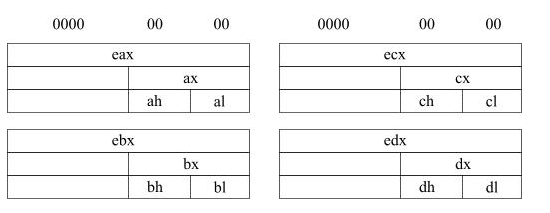
Graphic from here
Complete Performance Lab 2