Introduction to Assembly Programming
content:
    jmp .introduction

.introduction:
    mov rax, HowToASM
    jmp .basic_operations

.basic_operations:
    call .arithmetic
    call .bit_operations
    mov rcx, DataTypes
    jmp .control_flow

.control_flow:
    jmp .hardware_essentials

.hardware_essentials:
    mov rax, Memory
    mov rcx, Interrupts
    call FloatingPoint
    call Simd
    call .systems_programming

.systems_programming:
    ret
Objectives
- Understand the relationship between assembly language and opcodes
- Understand byte ordering, as it pertains to Assembly programming
- Identify x86(_64) General Purpose Registers
- Perform basic memory access operations
- Begin debuggin with the GNU Source-Level Debugger (GDB)
- Understand basic data sizes and types with regard to x86(_64)
Lesson Objectives:
-
LO 1 Review computer fundamentals necessary to contextualize Assembly. (Proficiency Level: B)
- MSB 1.1 Describe the specifics of x86 architecture. (Proficiency Level: B)
- MSB 1.2 Describe the specifics of x86_64 architecture. (Proficiency Level: B)
- MSB 1.3 Differentiate data sizes and their prefixes in computer soft- and hard-ware (Proficiency Level: B)
-
LO 2 Understand underlying structure and methodology for working with Assembly. (Proficiency Level: B)
- MSB 2.1 Identify an operand as part of an instruction in Assembly (Proficiency Level: B)
- MSB 2.2 Understand the purpose of an assembler (Proficiency Level: B)
- MSB 2.3 Understand the implications of the term 'endianness' to data (Proficiency Level: B)
- MSB 2.4 Identify and describe 64 bit registers (Proficiency Level: B)
- MSB 2.5 Identify and describe 32 bit registers (Proficiency Level: B)
- MSB 2.6 Identify and describe the lower 16 bit registers (Proficiency Level: B)
- MSB 2.7 Identify and describe the 'high' 8-bit registers (Proficiency Level: B)
- MSB 2.8 Identify and describe the 'low' 8-bit registers (Proficiency Level: B)
- MSB 2.9 With required resources, describe the purpose and use of the NASM assembler (Proficiency Level: B)
- MSB 2.10 Understand the implementation of opcodes in Assembly (Proficiency Level: B)
- MSB 2.11 Understand how the assembler works (Proficiency Level: B)
- MSB 2.12 Identify differences across assemblers (Proficiency Level: B)
-
LO 3 Differentiate data types and registers in Assembly. (Proficiency Level: B)
- MSB 3.1 Identify the purpose of movzx in Assembly. (Proficiency Level: B)
- MSB 3.2 Identify the purpose of xchg in Assembly. (Proficiency Level: B)
- MSB 3.3 Identify unique characteristics of registers in Assembly. (Proficiency Level: B)
- MSB 3.4 Identify different data types in Assembly. (Proficiency Level: B)
-
LO 4 Describe Advanced Data Type use in Assembly (Proficiency Level: B)
- MSB 4.1 Understand the purpose of 'structure' in Assembly' (Proficiency Level: B)
- MSB 4.2 Understand iteration of consecutive memory addresses in Assembly, i.e, how to iterate through an array (Proficiency Level: B)
Performance Objectives (Proficiency Level: 3c)
-
Conditions: Given access to (references, tools, etc.):
- Access to specified remote virtual environment
- Student Guide and Lab Guide
- Student Notes
-
Performance/Behavior Tasks:
- Write programs to move, replace, and swap values in registers using Assembly.
- Write programs partially copying data - leveraging and adapting across registers of different sizes.
- Identify and access different registers appropriately in Assembly.
-
Standard(s)
- Criteria: Demonstration: Correctable to 100% in class
- Evaluation: Students will have 4 hours to complete the timed evaluation consisting of both cognitive and performance components.
- Minimum passing score is 80%
Section 1.1: Computer Basics
Before we can understand assembly, we must first understand some computer basics.
Computer Basics:
Binary:
- Binary simply means "composed of, or involving two things." In our case, with computers, we are speaking of a data size called bits. Binary in relation to computers, in the most basic sense, represents "on/1", "off/0". When combining multiple bits, we can come up with larger data units that can represent more complex data such as numbers or text.
Data Sizes
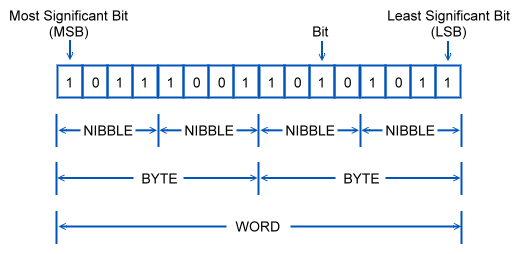
- Bits: Bits are the smallest unit of data a computer can offer. These are represented as a single binary value: 0 or 1. 8 bits equal a byte
- Bytes:
- Bytes are a unit of information storage.
- They are a series of 8 bits. Though it's not as easy as just combining 8 bits together.
- Each bit represents a different number. When a bit in a byte is turned on, the overall numeric representation of the byte changes.
- Bytes are read from far right bit (least significant bit or LSB) to far left bit (most significant bit or MSB).
- Each bit (and all data on computers) are meassured in powers of 2
- These are the values of each bit: 128 | 64 | 32 | 16 | 8 | 4 | 2 | 1 - with 128 being the MSB and 1 being the LSB.
- If all bits are turned on, the largest number we get is 256, giving us 256 unique "patterns" we can create.
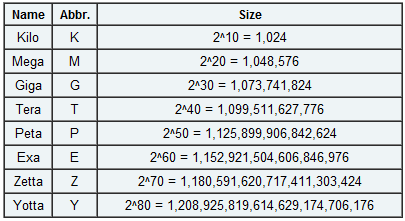
- Bytes can be combined into larger information storage types:
- Kilobytes 2^10 = 1024 bytes
- Megabytes 2^20 = 1,048,576 bytes
- Gigabytes 2^30 = 1,073,741,824 bytes
- Terabytes 2^40 = a huge number...
- and so on...
- Ever notice that a hard drive is smaller than advertised? Well, that's because the folks who create hard drives use 1000 kilobytes in a megabyte. It comes out to quite a difference in larger hard drives.
- We also have a few other data units such as Nibble (4 bits), Word (16 bits) and some others we will be going over later.
Hardware Components
CPU (Central Processing Unit):
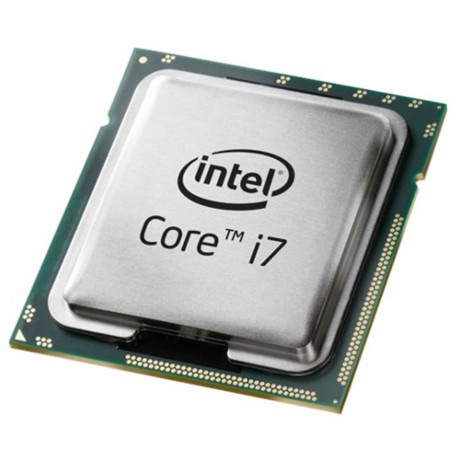
- The CPU is the electronic circuitry within a computer that carries out program instructions by performing basic arithmetic, logical, control and input/output (I/O) operations. In other words, the CPU is what's doing all of the "thinking". This is the primary piece of hardware actted upon by assembly. Things that happen here are happening the fastest. This is also the central point at which we define speed... The further removed hardware is from the CPU, the slower it is handled. When we say registers, we are refering to the CPU.
RAM (Random-Access Memory)

- RAM is a form of computer data storage that stores data and machine code currently being used. This is the secondary piece of hardware assembly acts on. When we say we are accessing memory addresses, we are refering to RAM.
HDD/SDD (Hard Disk Drive/ Solid State Drive)
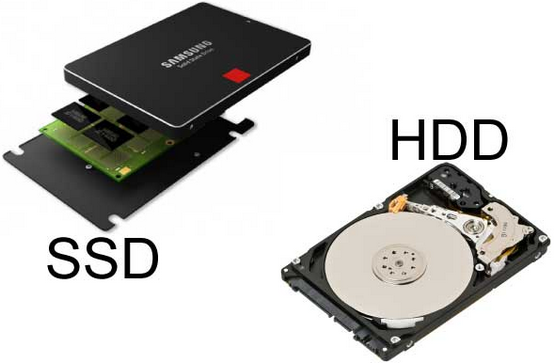
- Disk drives are a data storage device which are non-volatile (meaning they retain stored data even when powered off). Disk drives are one of the components furthest from the CPU. They are much slower than CPU instructions or access to RAM... but they can hold much more data, even when not being used. There are two types of Disk Drives currently, Hard Disk Drives and Solid State Drives. HDDs rely on rotating disks and other additional moving mechanics to store data. Whereas an SSD does not have many moving parts, if any. Due to this, SSDs are faster and less prone to shock damage. Regardless, additional information about either type of disk drive isn't really helpful for this course. When we say file I/O... this is where we are talking about.
CPU Architecture
We won't get too far into this, but there are different CPU architectures that offer different register sizes and such. Some basic ones to keep in mind for now are:
- Intel x86(_64)
- Intel x86
- AMD x86
- AMD x86(_64)
- ARM
- PowerPC
Additional Information
- x86 refers to Intel's processor architecture that was used in PCs. It was a backwards compatible to 16-bit systems and currently supports up to 64 bit standard register sizes via the x64 extension. This is not including SIMD registers (which can be upwards of 512-bit). Don't worry too much about what registers are just yet.
- x86(_64) is an extension for x86 that brought raised the register size from 32bit to 64bit. This was done to combat 32bit x86's processor limitations in memory addressing in an age where everyone else was on 64bit systems only. x86(_64) provides backwards compatibility while utilizing the performance advantage of 64 bit architectures [See Below].
A History of Copying
-
As mentioned above, x86 refers to Intel's processor architectures that was used in PCs (80186, 80386, 80486). In 1982, AMD was contracted by Intel to be a second-source manufacturer of the 8086 and 8088 Intel processors. AMD then went on to develop it's own chip, the Am286. In 1984, Intel decided to no longer cooperate with AMD and refused to convey technical details of the Intel 80386 to AMD. In 1987, AMD invoked arbitration over the issue causing Intel to cancel their 1982 technological-exchange agreement altogether. AMD eventually won arbitration in 1992 causing Intel to dispute which led to a Supreme Court case in California that sided with AMD.
-
In 1990, Intel countersued AMD, forcing AMD to clean-room design versions of Intel code for it's x386 and x486 processors... long after Intel had released its own x386 in 1985. In March 1991, AMD released the Am386 which was a clone of the Intel 386 processor. This eventually led to an agreement between Intel and AMD where AMD received the rights to the microcode in Intel's x386 and x486 processor families, but not the rights to any processors that followed.
-
Fast forward, AMD eventually caught up to Intel, by the 2000's it became clear that 32-bit x86 processors were just not going to cut it in a time where 64 bit processors were coming out. So Intel attempted to create a backwards compatible 64bit/32bit processor, which failed. Then Intel decided to drop 32-bit all together, which failed. Finally, AMD decided to take another path of backwards compatibility that did not suffer the same high costs and performance issues as Intel's first attempt. In 2003, AMD released the first x86 processor with 64-bit general-purpose registers, the Opteron. This brought in additional capabilities such as accessing much more than 4GB of virtual memory using the new x86(_64) extension (also known as AMD64).
-
In July 2004, Intel responded with it's own x86(_64) processor, the Prescott Pentium 4. Which currently brings us to our CPU battles today.
The Future
-
In 2020, Apple began creating it's own CPUs - transitioning to ARM. Apple has had a history of using PowerPC chips and now Intel chips. But it feels the CPU market is moving too slow.
-
In 2019, Apple dropped 32 bit support on it's operating systems.
How does this apply to us?
- As we will discuss, different CPU Architectures have their own quirks and features. There are also different syntaxes for these architectures. Most importantly - we need to understand the different sizes of general purpose registers in relation to the CPU Architecture. 64 bit CPUs for instance - have more and larger general purpose registers (cf. RAX). By contrast, a 32 (cf. EAX) or 16 bit OS will only have registers up to that size. This will dictate the instructions we use and how we access different types of data.
Section 1.2: Assembly Basics & Memory
Now that we understand some basic computer concepts, we can hop into Assembly with a bit more understanding of some of it's underlying concepts.
Understanding Assembly
What is assembly?
Assembly provides "instructions" (aka human-friendly) that map to opcodes. Assembly is typically very hardware-specific.
Why use assembly?
There are a number of reasons to use assembly. The most common reason is performance. Rather than letting the compiler come up with possibly long and drawn out assembly on compilation, creating the asm yourself could provide better optimization. Assembly also exposes hardware features that may not be readily available through higher level languages. Lastly, some operations are easier to express than in higher level languages such as Python or C.
Assembly Instructions and Opcodes
Operands
Assembly code typically consist of an instruction of some kind and some operands. Operands can consist of several things, such as Registers, Memory Addresses, and Immediate (literal) Values. There are also other data types and some prefixes (which modify what the instruction does).
Opcodes
Opcodes are one or more bytes that the processor decodes (and executes). Typically opcodes translate directly from assembly language instructions, thus the syntax is slightly complicated. Opcodes can be different sizes depending on the system archetype.
Instructions
- This set of instructions:
mov eax, 0x01
ret
- Becomes:
0xb8 0x01 0x00 0x00 0x00
0xc3
Assemblers and Syntax
There are a number of different assemblers to choose from. With different assemblers come different syntaxes. There are some other slight differences and quirks depending on the Assembler you choose. Here are some of the different assemblers to choose from:
- GAS: The GNU Assembler
- NASM/YASM: The Netwide Assembler/Yet Another Assembler (a rewrite of NASM)
- MASM: The Microsoft Assembler
We will be using NASM on this course which uses Intel Syntax
Syntax Differences
- Intel Syntax (Used by NASM/YASM and others):
mov eax, 0x01
- AT&T Syntax (Used by GAS and others)
movl $0x01, %eax
- Other syntaxes do exist
Byte Ordering
Byte ordering determines the order in which bytes appear in memory. In the US and much of the Western world, we are conditioned to read from left to right. However, computers can read data as specified by engineers. In our case, we are only concerned with how a computer determines the order to read bytes in memory.
-
Big Endian stores the most significant bytes (or largest) value first.
- Therefore, the memory address: 0x10203040 would appear as... 0x10 0x20 0x30 0x40
-
Little Endian on the other hand stores the least significant bytes (or smallest) first.
- For instance, the memory address: 0x10203040 would appear as... 0x40, 0x30, 0x20, 0x10
- Little Endian is what x86(_64) processors use.
- Again, the least significant byte (not bit) is what appears first.
- In memory, this address:
0xdeadbeef - Becomes:
0xefbeadde
Breakdown
|Initial:| 0xde | 0xad | 0xbe | 0xef |
|Memory:| 0xef | 0xbe | 0xad | 0xde |
Memory
When talking about memory, there are multiple types of memory components. These memory components vary in access speed. Most higher level languages (such as C or Python) abstract this concept away so that the developer is not very exposed to it. Assembly, however, gives the programmer more control although some things are still hidden on modern systems.
Memory: Fastest to Slowest
- Registers
- Cache (L1/L2/L3)
- System Memory (RAM)
- Disk (HDD/SDD/etc)
Virtual Memory
Virtual Memory is a feature of modern operating systems that add a bit of abstraction from the hardware. Most addressing deals with virtual addresses, that is to say, if we want to access an address we do so by utilizing virtual addresses. These addresses are translated (via the lookup table) to physical addresses.
**Additional Features of Virtual Memory:**
* More than one "view" of of a physical memory address can exist (in different processes). That means we can access the same physical memory address through the use of multiple virtual addresses.
* Each user mode process appears to have a full range of addressable memory and resources
* Most modern OS's support paging.
Memory: Process Memory Layout
Below is a very high level view of the Process Memory Layout:
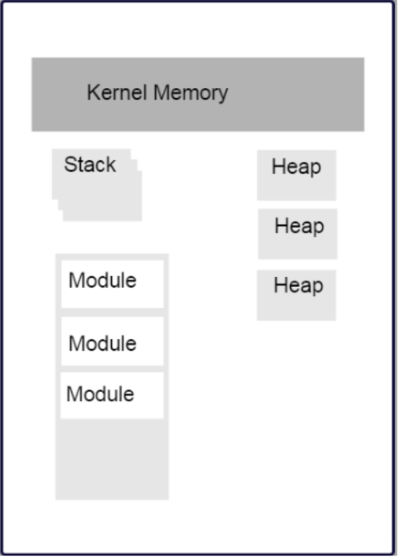
- Stack segments typically grow from high memory addresses to low.
- We will revisit the stack in the next section.
- Modules in the diagram above indicate executable files loaded into the file space. This includes:
- Glibc (specifically the .so containing the libc code)
- kernel32.dll
- Currently running executable
- There are also the HEAP sections and anonymous mappings
- Kernel Memory
- Other Items
Registers
Assembly programming gives us complete access to registers. We are also given access to special hardware instructions on the processor. Some registers are general purpose (can store any type of data) while others are more specialized. These specialized registers can contain: status codes, flags, or be associated to specific hardware. Registers are limited in number and that number depends on a number of factors to include chip and architecture.
General Purpose Registers
General Purpose Registers give us access to sub-registers. Depending on the processor, registers will have a set maximum size, different naming conventions, etc. The larger the size, the more sub-registers we have.
Namely:
- There are four main type of register sizes: 64bit/32bit/16bit/8bit.
- If you have a 64bit system, you have access to 64bit registers and their sub-registers
- The sub-registers of a 64bit system are simply: 32bit/16bit/8bit.
- The same is for any size
- If you have a 64bit system, you have access to 64bit registers and their sub-registers
- Sub-registers are NOT their own register. They simply act as a way of only modifying a certain number of bits of the total size register, depending on the processor. So if we have a 64bit CPU and access the 18bit sub-register of one of the 64bit registers, only the lower 18bits get accessed/modified. There are of course exceptions to higher/lower, etc. that we will cover later.
- Keep that in mind than when modifying a sub-register, the bits in the overarching (i.e. actual) register are modified.
- x86(_64) contains many more registers than x86. But not all of those registers have sub-registers.
x86(_64) Registers
| 64bit | 32bit | 16bit | 8bit high/low |
|---|---|---|---|
| rax | eax | ax | ah/al |
| rcx | ecx | cx | ch/cl |
| rdx | edx | dx | dh/dl |
| rdi | edi | N/A | N/A |
| rsi | esi | N/A | N/A |
- There are other registers:
- rbp/ebp: Base Pointer
- rsp/esp: Stack Pointer (More to come on both of these)
- rip/eip: Instruction Pointer (or Program Counter)
- Additional x86(_64) registers: r8-r15
Register Data and Pointers
-
General Purpose Registers can contain up to pointer-sized amounts of data (4 bytes on 32bit, 8 on 64bit)
-
They can also contain memory addresses (pointers) to blocks of data residing elsewhere in the process.
-
Addresses can be manipulated via addition, subtraction, multiplication, etc
-
Square brackets dereference (Access the data stored at the memory address)
- Example:
; a register we will be acting on whatever is directly stored in it (address or data) rax ; a register that we assume has an address to some data ; We are attempting to access that data and manipulate it [rax]- Let's look at another example:
mov rax, 0xc0ffee   ; a memory address, hopefully valid! (What happens if it's not?)
mov [rax], 100      ; now we store some data in that address

; now let's copy that address to another register
mov rcx, rax        ; Both rax and rcx point to the same location, right?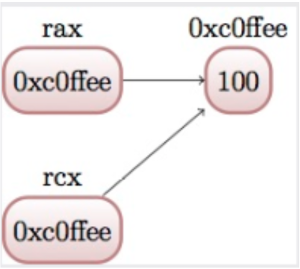
- Now let's copy the data stored at the address, and put it into RCX
mov rcx, [rcx]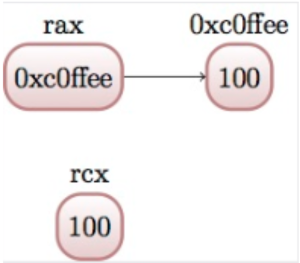
- How does this work?
- RCX is currently holding an address. To be even more specific, RCX's data is a numeric value...
- We tell the assembler that RCX's data, though numeric, represents a address and that we want to access it. That's where the dereference blocks come in [].
- The assembler then says: Okay, this is an address. Let me access it.
- After the assembler accesses it... we grab the data that's at that address and pull it out and store it back into RCX... replacing the address.
- In summary:
- [UNCHANGED] the address itself (It's no longer being pointed to by RCX though)
- [UNCHANGED] the data that's at the address (We stored 100 in there, but never acted on it since)
- [CHANGED] the value stored in RCX (to whatever data was in the address)
- What happens if you try to mov a dereferenced address value into a dereferenced address value?
Instructions
NOP
- Does nothing (Kinda sorta)
- Used for padding/alignment and timing reasons
- Idempotent instruction (does not affect anything else in the system)
- 1 byte NOP instruction translates to opcode 0x90 (more to come on this)
Memory Access
We'll begin looking at instructions to copy and access data from various locations in memory. Additionally, we will begin examining address calculation
mov instruction
- The mov instruction moves a small block of memory from a source (right hand operand) to the destination (left hand operand)
- Amount of data can be specified (will go over later)
- Basic usage:
mov rax, 0x01           ; immediate - rax is now 1
mov rax, rcx            ; register - rax is now a copy of rcx
mov rax, [rbx]          ; memory - rbx is treated as pointer, it's data is copied into rax
mov rax, qword [rbx + 8]; copying a quad word (8 bytes) into rax
- Note - these operations are described as copy
Just because the instruction is "mov", doesn't mean we are moving anything.
lea instruction
- Load Effective Address Instruction
- Calculates an address, but does not attempt to access it
- This is useful when wanting to use address calculation (ex: [rdx+4]) but not wanting to change the address
- For example:
; calculate the address by taking the address of what rdx points at, /
; and adding 8 bytes to it (perhaps indexing into an array?)
; NOTE: We are just calculating the addressees, not changing them!

lea rax, [rdx + 8]
mov rax, [rax]          ; this will access whatever was in rdx + 8

; what's different from above vs

mov rax [rdx, + 8]

; or...
add rdx, 8
mov rax, [rdx]
xchg instruction
- Exchange instruction
- Exchanges the values provided atomically.
- In other words, it SWAPS the values.
xchg rax, rcx   ; exchange two register values
; exchange a register value with a value stored in memory
xchg rax, [rcx]

; live example
mov rax, 10
mov rcx, 20

xchg rax, rcx   ; what is the value or rax and rcx now?
mov rcx, 0xdeadbeef     ; setting rcx to a address
mov [rcx], 0
xchg rax, [rcx] ; what is the value of rax and rcx now?
Section 1.3: Debugging Assembly (pt 1) & Making the Files
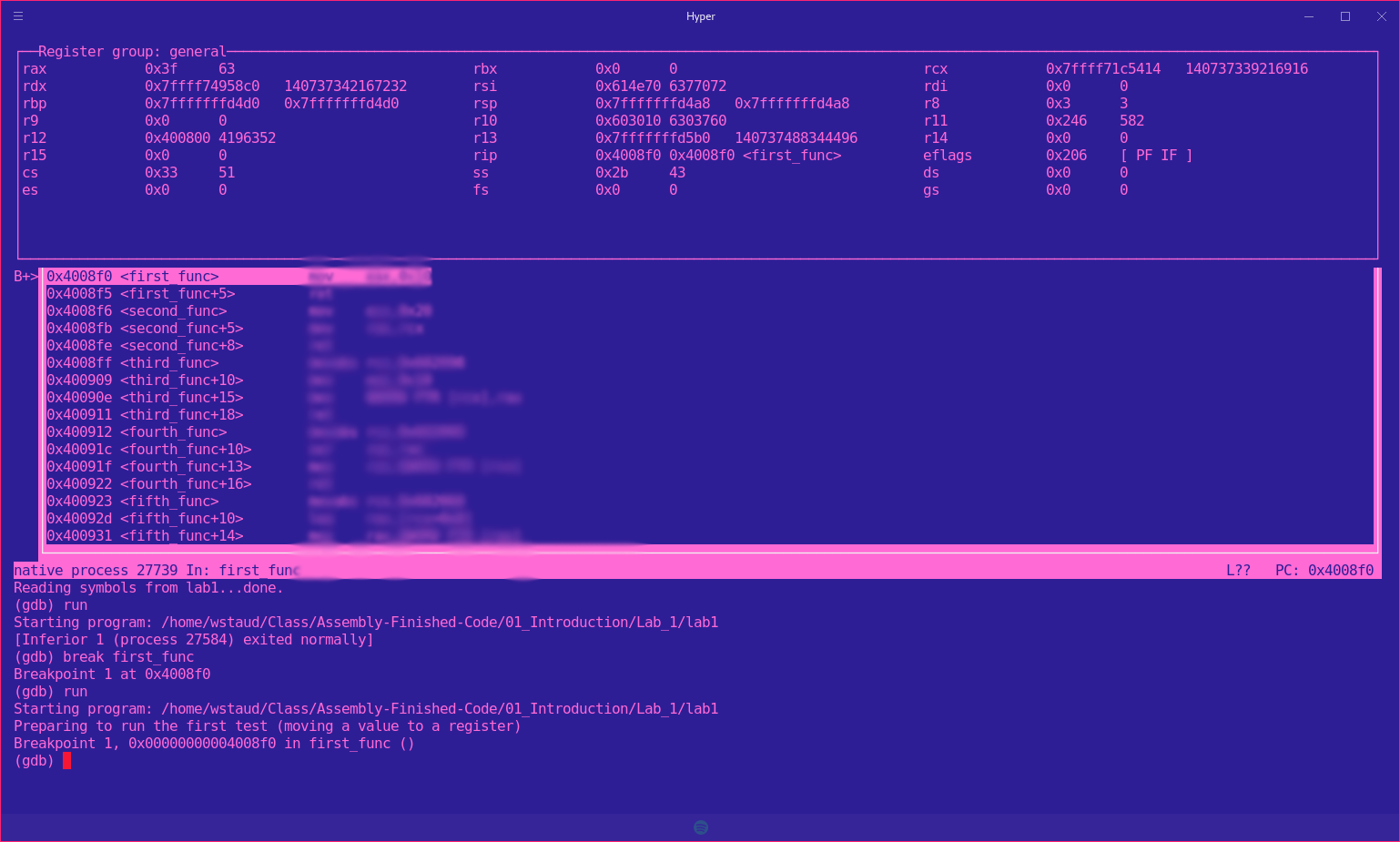
Why Debug Assembly?
Unlike many other programming languages, assembly allows for much more control over lower level software/hardware. We will be making changes that are much harder to track mentally. Debugging allows us to see the memory itself, registers, etc. Some debugging tools even allow us to modify said registers and memory values.
We will be using the GNU Project Debugger or GDB for short while in Linux. GDB is a command line debugger which provides a large set of features:
- Natively supports Python scripting
- Supports a large number of architectures (and even quite a few languages)
- Provides a Text User Interface (TUI) mode
How to Debug using Assembly
Preconfiguration
When launching GDB, you may notice your interface does not look like mine. This is because I use a configuration file that adds customization to my interface. Lucky for you, we provided you with a preconfiguration file. The gdbinit providese a way to run a number of setup commands at launch. You will just need to copy the config file to your home directory:
cp ~/path/to/repo/handouts/sample-gdbinit ~/.gdbinit
The instructions above will copy the sample gdbinit to your home directory as a hidden file (as directed by the . in front of the name) and will rename it to gdbinit
Make the Files
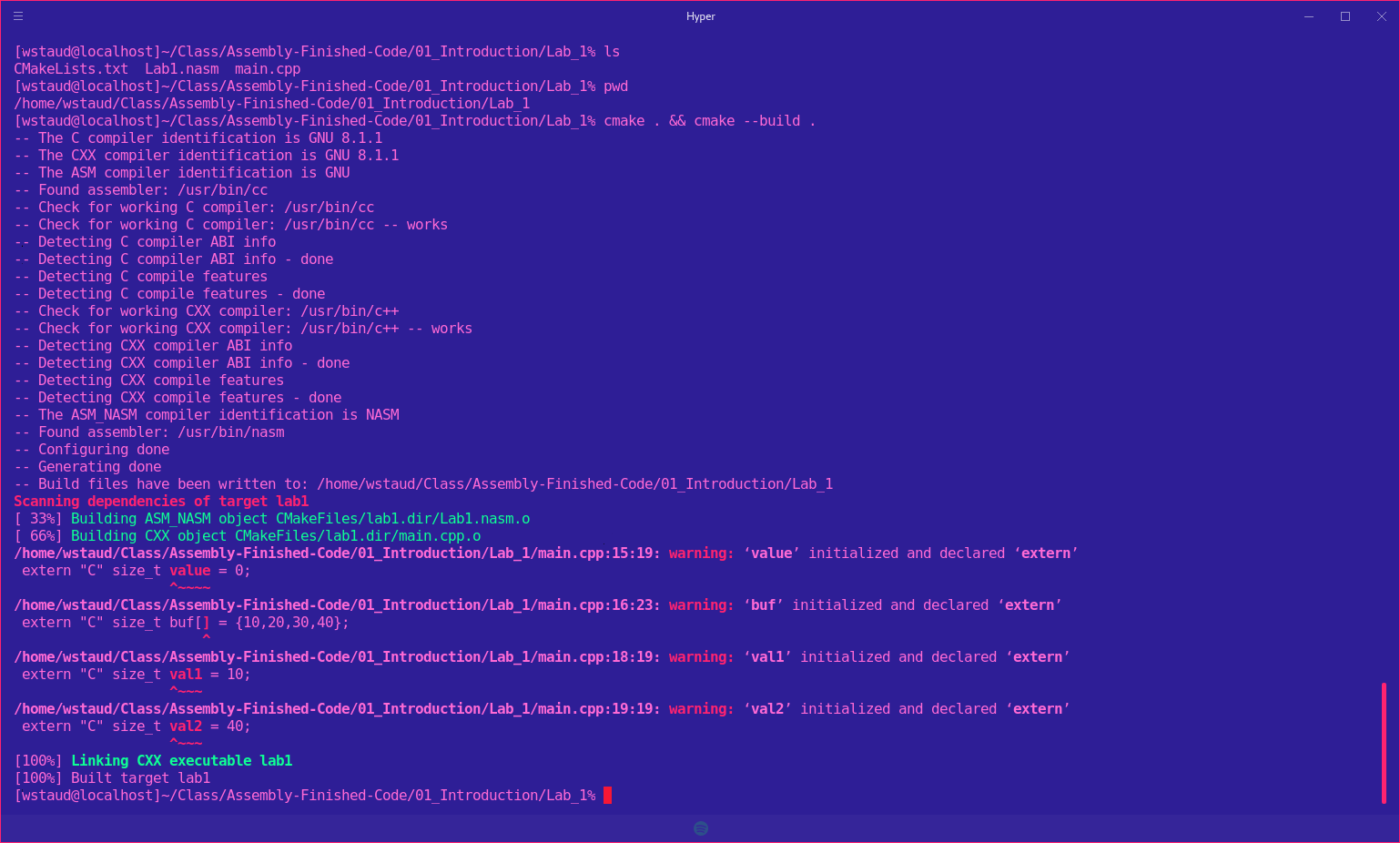 After you have written your code, you will need to cd to the path and run a series of commands to make the files.
Change Dirs to proper lab:
cd ~/path/to/lab1/
Make the files (DO NOT FORGET THE PERIODS!):
cmake . && cmake --build .
There is a file in the lab directory called CMakeLists.txt. This file instructs/configures a program build tool called CMAKE to build the nasm and cpp file and output an executable. If you peek inside of the cpp file, you will notice a couple of things. First, we "extern" some functions. This allows us to create a link of sort between the nasm and cpp file. We then later call  the extern'd function in main (or some other function) as if it were a regular function. If you don't understand how the
  C/C++ compiler and linker work, feel free to ask for a refresher and I will provide one given we have time.
Launching an Executable with GDB
- CD to directory containing lab
- run: gdb labx (x being the lab number)
- In the GDB window, type "run" to execute the program. The program will run all the way through because there are no break points.
- In the GDB window, type "quit" to quit GDB. You will be returned to the standard terminal.
$ cd ~/path/to/lab1
$ gdb lab1

(gdb) run
...
(gdb) quit
Basic Usage
- info (command) : displays information (in general, or about a specific command)
- help (command) : can provide context-specific help; t.g., listing avaliable commands/options
- refresh : will redraw the console window (very important)
Breakpoints (break)
Using breakpoints allows us to programmatically set breakpoints without modifying application source code. We can set breakpoints on memory addresses, symbols (such as funciton names), etc.
- break (location) : will create a breakpoint at the location.
- info break : shows us information about all currently set breakpoints
- clear or delete : Allows us to remove breakpoints
Example:
(gdb) break myfunc
Breakpoint 1 at 0x4004a4
Num     Type       Disp     Enb     Addreses
1       Breakpoint  keep    y       0x00000000004004a4
(gdb) delete 1
(deb info break)
No breakpoints or watchpoints
Setting breakpoints programmatically as shown above, may sometimes be difficult. A good strategy may include applying breakpoints directly in your code for debugging purposes. Fortunately, an assembly instruction exists for doing just this!
int3; NOTE: no space between int and 3
Which translates to the opcode:
0xcc
By placing the above in your code, the debugger will be interrupted on run and will automatically wait for the user to continue the program or start stepping before continuing.
Instructions
- step/s : Single stepping (can also use stepi)
- next/n : Stepping Over (can also use nexti)
- continue : continue normal execution (you can also create another breakpoint and continue to it)
- finish : Continue until the current function returns
Additonal Resources
Lab1
Proceed to the Lab1 directory and follow instructions
Lab1: Memory Access
- Copy the Lab1 folder (and it's contents) to a location of your choosing. Remember, you do not want to modify anything inside of the repository folder that you cloned. This way you can pull down future changes to the git repository if there are any.
- Modify the *.nasm file. This is the file you will be modifying throughout the ASM course. You may look at the other files if you wish (it is recommended). Each function should have a comment block - lines starting with ';' containing instructions.
- Build and run using the following commands:
cd ~/path/to/copied/folder/Lab1
cmake . && cmake --build .
./lab1
Assembly Data Types and GDB Part 2
- When we think "data types", we need to understand that in Assembly, it's a different concept than in higher level languages. Typically in Assembly, data types are just bytes in a buffer. "Data type" is just an interpretation that's differentiated by size, alignment and certain bits being set.
- Some operations preserve special properties in a given data set (such as sign, e.g. (+/-))
- Other operations may expect different alignments in data, or may have issues with certain values (like floating points)
X86(_64) General Data Sizes
- Byte - smallest addressable unit (8 bit)
- Word - 2 bytes
- Dword - double word (4 bytes - x86 pointer width)
- Qword - quad word (8 bytes - x64 pointer width)
GDB: Examining Memory
- We can use GDB to examine various places in memory "x" (for "eXamine")
- x has several options:
- x/nfu - where n is the Number of things to examine, f is the Format and u is the Unit size
- x addr - examines the memory address typed in by the user
- x $
- examines the memory address pointed to by the register
GDB Formatting
- The "f" in x/nfu stands for formatting as we stated above
- Format options include:
- s - For a NULL-terminated string
- i - For a machine instruction
- x - for a hexadecimal (the default, which changes when x is used)
- For example: Disassembling at RIP
(gdb) x/i $rip
GDB Unit Sizes
- The "u" in x/nfu stands for Unit Size as we stated above
- Unit size options are a bit confusing in the context of x86/(_64) assembly and include:
- b - bytes
- h - halfwords (equivalent to "word" in x86(_64) asm; e.g., 2 bytes)
- w - words (4 bytes, equivalent to dwords)
- g - giant words (8 bytes, equivalent to qwords)
Sub Registers
- Sub-registers are a part of the bigger "parent" register
- Unless special instructions (not yet mentioned) are used, will not modify data in the other portions of the register when used.
| 64bit | 32bit | 16bit | 8bit high/low |
|---|---|---|---|
| rax | eax | ax | ah/al |
| rcx | ecx | cx | ch/cl |
| rdx | edx | dx | dh/dl |
| rdi | edi | N/A | N/A |
| rsi | esi | N/A | N/A |
Memory/Register Access - mov
- When accessing memory, the amount of data to copy can be specified:
mov al, byte [rsi]      ; copy a single byte
mov eax, dword [rcx]    ; copy a dword (4 bytes)
mov rax, qword [rsi]    ; copy a qword (8 bytes)
Notice the register/sub-registers used? They match the size of data we are copying.
- Also, data can be copied from sub-register to sub-register:
mov al, cl      ; copy from cl to al
xchg al, ah      ; exchange the low and high bytes in ax
Register Access - movzx
- movzx stands for "Move with zero extend". When moving source data that is smaller than the destination size, zero out the remaining bits.
- Basic use:
movzx rax, cl                   ; everything above al is now set to 0
movzx rax, byte [rsi + 5]       ; what happens here?
NOTE:
- The first letter in "al" represents the middle letter in the 64 and 32 bit register... rax/eax. - The second letter, 'l', stands for low (or 'h' high). This applies to all registers and sub-registers. rCx = ch/cl. rDx = dh/dl. etc.
- 16bit registers always end in 'x' and start with their parent's middle letter. rax/eax = ax. rcx/ecx = cx, etc.
This should make it easier to remember the sub-registers of the parent register!
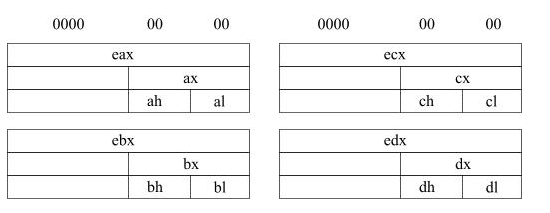
Graphic from here
Complete Performance Lab 2
Lab2: Data Types
- Using sub-registers, accessing smaller values and zero extending
- Copy the Lab2 folder and its contents
- Modify the *.nasm file (Each function should have a comment block - lines starting with ';' containing instructions)
- Build and run using the following commands:
cd ~/path/to/copied/folder/Lab2
cmake . && cmake --build .
./lab2
Advanced Types and Concepts
Structures
- NASM provides a data structure concept for convenience in hanlding complex data types
- More of a macro than something representative of a C-style struct
- So try not to compare this to a C-style struct too much
- Very useful for keeping track of local variables or parameters (among other things)
struc MyStruct
    .field1         resd 1      ; field1's size is 1 dword
    .field2         resd 1      ; field2's size is 1 dword
    .field3         resq 1      ; field3's size is 1 qword
    .next           resd 1      ; next's size is 1 dword... address to next node in linked-list (if this were a linked list)
endstruc

; ...
; Let's assume rdi points to MyStruct
; This will be equivalent to: mov rax, [rdi+8]
mov rax, [rdi + MyStruct.field3]

; Assuming this is a linked list
mov rdi, [rdi + MyStruct.next]

; After the instruction above completes, we are on the next node.
Array Iteration
- Iterating through an array requires knowing the size of the elements within it.
- To iterate through an array, you simply dereference the address and add the amount of bytes to the next element.
; assume rsi is storing the address to an array of characters
mov rax, [rsi]      ; this gives us the first character
mov rax, [rsi+1]    ; this gives us the second character
mov rax, [rsi+5]    ; this gives us the sixth character
mov rax, [rsi]      ; this still gives us the first character

; there is also this method, not recommended if it can be avoided
inc rsi             ; this will set rsi to the second character
mov rax, [rsi]      ; this will give us the second character

; The above works great, now let's assume it's an array of ints
; ints are generally 4 bytes
; We can use another method to allow for iteration

mov rax, [rsi]          ; still grabs first int
mov rcx, 2              ; let's grab third element, by setting a count
mov rax, [rsi+rcx*4]         ; this is essentially rcx * 4 (so count x size) and adding it to the array's address

; As well as with characters, there is this method
add rsi, 4          ; next iteration
mov rax, [rsi]      ; next iterations value
add rsi, 4
mov rax, [rsi]      ; third value
; ...
Ch02 Basic Operations
Objectives
- Utilize basic arithmetic and bit operations
- Understand the difference between signed and unsigned values - from an assembly perspective
- Understand the Two's complement representation of signed numbers
- Understand and use the stack in assembly programming to write functions to load and store data
Lesson Objectives:
-
LO 1 Recognize methods in Assembly for using the stack (Proficiency Level: B)
- MSB 1.1 Understand how to use the stack (Proficiency Level: B)
- MSB 1.2 push and pop to the stack in Assembly (Proficiency Level: B)
-
LO 2 Identify, differentiate, and leverage arithmetic functions in Assembly. (Proficiency Level: B)
- MSB 2.1 Identify how to add and subtract in Assembly. (Proficiency Level: B)
- MSB 2.2 Articulate the procedures and registers for multiplication and division in Assembly. (Proficiency Level: B)
- MSB 2.3 Identify how to increment and decrement registers in Assembly. (Proficiency Level: B)
-
LO 3 Differentiate methods and purposes for bitwise shifts in Assembly. (Proficiency Level: B)
- MSB 3.1 Understand the purpose of the scas instruction. (Proficiency Level: B)
Performance Objectives (Proficiency Level: 3c)
-
Conditions: Given access to (references, tools, etc.):
- Access to specified remote virtual environment
- Student Guide and Lab Guide
- Student Notes
-
Performance/Behavior Tasks:
- Apply knowledge of the stack through commands in Assembly
-
Standard(s)
- Criteria: Demonstration: Correctable to 100% in class
- Evaluation: Students will have 4 hours to complete the timed evaluation consisting of both cognitive and performance components.
- Minimum passing score is 80%
Arithmetic Instructions

The add and sub Instructions
- Description:
- Adds and subtracts arbitrary values. The destination (where the result is stored) is the first value provided (i.e. the left value).
- Basic Use:
- We can use a combination of registers and immediates as operands:
mov rax, 1
add rax, 2      ; rax now contains 3
sub rax, 1      ; rax now contains 2
mov rcx, 2
add rax, rcx    ; as above, rax now contains 4
sub rax, rcx    ; rax is now back to 2
The mul Instruction
- Description:
- Allow multiplication of arbitrary values. Takes a single argument, multiples rax/eax/ax (depending on operand size) by src (whatever follows mul instruction). Result is stored in rax/eax/ax.
- Basic Use:
mov eax, 10
mov ecx, 10
mul ecx             ; rax now contains 100

mov rax, 5
mov rcx, 7
mul rcx             ; rax now contains 35
Mul: Storing Results
- Results are stored in the source (possible), or in a combination of registers in the configuration below:
| Operand Size | First Source | Destination |
|---|---|---|
| byte | al | ax |
| word | ax | dx:ax |
| dword | eax | edx:eax |
| qword | rax | rdx:rax |
The div Instruction
- Description:
- As with mul, div takes a single argument, and divides the value stored in the dividend register(s) by it. This is typically AX/EAX/RAX (and the *dx equivalents), but may vary a bit depending on the size.
- RDX is also needed. RDX is where the remainder will be stored. This register will need to be set to 0 before division can take place. Otherwise you'll get a SIGFPE.
- TL;DR: RAX/src (src = rcx in this case). Results stored in RAX, remainder stored in RDX.
- Basic Use:
; clearing the register where the
; high bits would be stored, we're only using what's in rax!
mov rdx, 0
mov rax, 10
mov rcx, 2
div rcx         ; rax now contains 5
Div: Storing Results
- Where to retrieve the results of a div from depends on the size of the arguments. The table below illustrates this relationship:
| Maximum | Dividend | Quotient | Remainder |
|---|---|---|---|
| byte/word | ax | al | ah |
| word/dword | dx:ax | ax | dx |
| dword/qword | edx:eax | eax | edx |
| dqword/qword | rdx:rax | rax | rdx |
inc and dec
- Description:
- Adds or subtracts one from the provided register, storing the result in place.
- Basic Use:
mov rax, 1      ; rax now contains 1
inc rax         ; rax now contains 2
inc rax         ; rax now contains 3
dec rax         ; rax now contains 2
Lab3: Arithmetic Operations
- Copy the Lab3 folder (and its contents)
- Modify the *.nasm file (Each function should have a comment block - lines starting with ';' containing instructions)
- Build and run using the following commands:
cmake . && cmake --build .
./lab3
The Stack

ATTENTION:
The stack can be a challenging concept to grasp. Try to relax your preconceptions for this section. Many concepts presented here may be new or counter-intuitive.
What is the Stack?
The stack is a linear data structure that follows a strict order in which operations are performed. It may help to think of the stack as a structure that tracks the operation to run next as well as previous operations as needed (to allow for returns and such).
- The stack grows from high memory addresses to low memory addresses
- When looking at a stack graphic, the top of the photo is the bottom of the stack (higher addresses), in which the stack grows down into lower addresses.
- The current function typically exists within a stack "frame" (but now always).
Stack Frames
A stack frame is a related piece of data that gets pushed onto the greater stack. A stack frame often represents a function call and it's argument data. We will be getting into much more detail in chapter 3 about how the stack frame works.
Registers
- Stack Pointer - RSP (or ESP) points to the top of the stack
- Base Pointer - RBP (or EBP) points to the "base" of the stack frame
- The base pointer is a location we use as reference to grab arguments and locals.
Stack Frame Layout
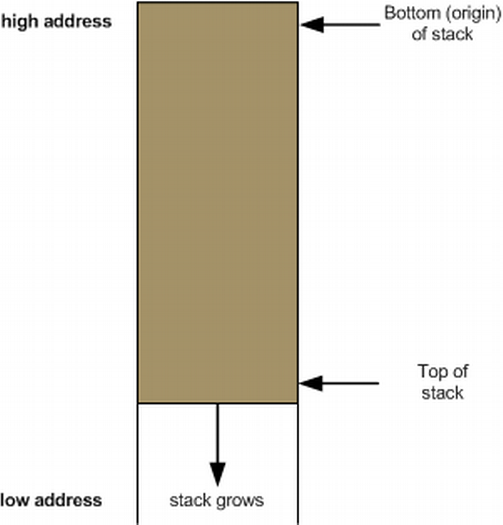
| ADDRESS | VALUE/REG |
|---|---|
| 0x0018 | RBP |
| 0x0010 | 0x0000 |
| 0x0008 | 0x0000 |
| 0x0000 | RSP |
Let's break it down further...
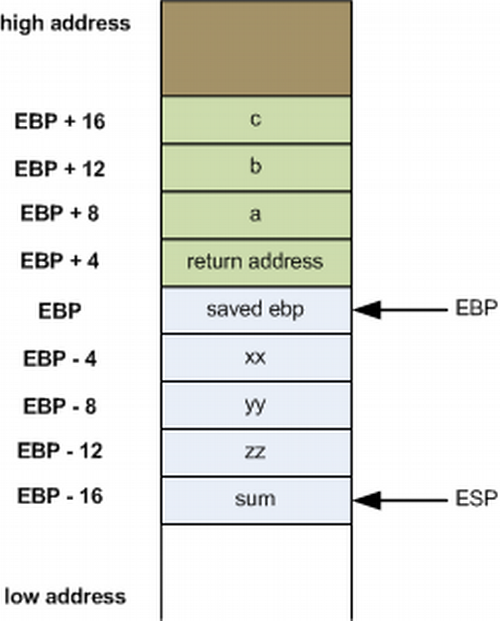
- The green represents function parameters
- The blue represents local variables
- The base pointer separates this for us, giving us a point in the stack frame to offset from in order to grab variables
- When working on a stack, the return address will always be EBP + 4
- On 64-bit architecture, we can actually access data with RSP and free up RBP as a general register. Though much more reliable than it's implementation in other architectures... it's still very hard to use. So for our purposes, we will be learning how to access data with RBP. And because it's the most common way to still do it.
- As we continue to modify the stack, RSP/ESP will always be moving.
Expanding the Stack Frame
We can modify the value of the RSP directly to allocate more stack space:
sub rsp, 16
But you must always ensure you clean up before the function returns:
add rsp, 16
In other words, what you take... you must give back
Stack Alignment
- x86_64 expects 16 byte stack alignment
- Allocating odd amounts of space can cause things to break
- Always make sure you clean up your stack before returning.
GDB - Stack Frames
- Examining the Call Stack (backtrace/bt)
- Frames and Information
- frame || f - Get information about the current frame
- info args - Get information about function arguments
- info locals - Get information about local variables
New Instructions: Push and Pop
-
Description:
- Push will subtract a pointer-width amount of space from RSP, and place the argument in the newly-allocated location. Pop performs the opposite action, storing the value just below RSP in the register provided, and adding a pointer-width amount to RSP. For every push, you will need to pop! It is important to pop in the opposite order in which you pushed.
-
Basic Use:
.first_func
    mov rax, 1
    mov rdx, 10

    push rax
    push rdx

    ; perform operations here

    pop rdx
    pop rax
Growing the Stack
- After a push operation:
| ADDRESS | VALUE/REG |
|---|---|
| 0x0028 | RBP |
| 0x0020 | 0x0000 |
| 0x0018 | 0x0000 |
| 0x0010 | 0x0000 |
| 0x0008 | Old RSP/Pushed Arg |
| 0x0000 | New RSP |
Restoring the Stack
- After a pop operation:
| ADDRESS | VALUE/REG |
|---|---|
| 0x0028 | RBP |
| 0x0020 | 0x0000 |
| 0x0018 | 0x0000 |
| 0x0010 | 0x0000 |
| 0x0008 | RSP |
| 0x0000 | Old RSP/Popped Arg |
Complete Performance Lab 4
Lab4: Stack Operations
- Copy the Lab4 folder (and it's contents)
- Modify the *.nasm file (Each function should have a comment block - lines starting with ';' containing instructions)
- Build and run using the following commands:
cmake . && cmake --build .
./lab4
Negative Numbers and Bitwise
Negative Numbers
Two's Complement
- You may recall from earlier modules - Negative numbers on the x86(_64) platform are represented via Two's Complement
- In short, two's complement is just a way to differentiate between negative and positive numbers at the binary level
- Negative numbers use the "complement" of positive numbers. So instead of starting at 0000... negative numbers start at 1111. The 1s and 0s are flipped.
- If the left most bit is 0 - the number is positive.
- If the left most bit is 1 - the number is negative.
- To get the negative version of a number... take the positive number, subtract by 1, then invert.
- This may be hard to understand at first, but let's look at it via positive numbers first. Use the decimal to bin chart below as reference.
- 3 = 0011
- Let's get -3
- Subtract 1 from 3 (3-1= 2) (2 = 0010)
- Invert: -3 = (1101) aka 0010 inverted is 1101
In order to find the two's complement - you can also find a number's 1's complement then add 1
- Let's take a look at another example!
- 4 = 0100 (we want -4)
- Subtract 1: 3 = 0011
- Invert: 1100 = -4
| Decimal | Positive Bin | Negative Bin |
|---|---|---|
| 1 | 0001 | 1111 |
| 2 | 0010 | 1110 |
| 3 | 0011 | 1101 |
| 4 | 0100 | 1100 |
Two's Complement Pros
-
Simplified addition operations
-
Unified add/sub
-
Example: Adding 2 and -1
Carry Row:    11
              1111
            + 0010
              ----
              0001
Two's Complement Cons
- There are few downsides to Two's Complement. The biggest downside - signed numbers have a smaller range in order to account for the extra bit that determines sign.
Sub Registers and Sign Extending
- When copying smaller data into a register, sign extending may be used (rather than zero extending)
- Sign extending preserves the "signed" attributes of the data being copied
- The
movsxinstruction (just likemovzx) handles this
The movsx Instruction
movsx- Description
- Much like
movzx,movsxcan be used to move data into a portion of a larger register, while preserving its sign.
- Much like
Bitwise Operations
Bit Shifting
- Two unsigned shift operations:
shl- shift leftshr- shift right
- Shifting moves the bits in the register over the direction (left or right) and number of bits specified
- Bits that fall off the end (and overflow) will disappear, except for the last one, which ends up in the carry flag (more to come on this)
- Extra space is padded with 0's
Left Shift
- The following snippet of assembly:
mov rax, 1
shl rax, 1
shl rax, 3
- Can be observed in the following table:
| Decimal | Binary | State |
|---|---|---|
| 1 | 00000001 | Initial |
| 2 | 00000010 | shl rax, 1 |
| 16 | 00010000 | shl rax, 3 |
Right Shift
- Similarly, in the following example:
mov rax, 32
shr rax, 1
shr rax, 4
- Can be observed in the following table:
| Decimal | Binary | State |
|---|---|---|
| 32 | 00100000 | Initial |
| 16 | 00010000 | shr rax, 1 |
| 1 | 00000001 | shr rax, 4 |
Binary and/or
andcan be used to determine whether or not one or more bits are set onorwill tell you if the bit is set on at least one place- Both take two operands, left will hold the result after the operation completes
- Use:
mov rax, 1              ; rax contains 00000001
mov rcx, 5              ; rcx contains 00000101

and rax, rcx            ; rax contains 00000001
or rax, rcx             ; rax contains 00000101
AND Table
| Set | Binary |
|---|---|
| First | 01010011 |
| Second | 01000010 |
| Result | 01000010 |
OR Table
| Set | Binary |
|---|---|
| First | 01010011 |
| Second | 01001010 |
| Result | 01011011 |
Binary NOT
- Inverts the bits in a given register.
- Example:
mov rax, 0              ; rax now contains 00000000
not rax                 ; rax is now all 1's (or 0xffffffff)
- Similarly:
mov rcx, 1              ; rcx now contains 1 (8bit: 00000001)
not rcx                 ; rcx now contains 0xfffffffe (8bit: 11111110)
XOR
- XOR yields 1 only if the bit is set in either the source or the destination, but not both
- Any value XOR'd with itself is 0 [This is one of the fastest, most effective ways to set a register to 0 in assembly]
- 0 XOR'd with any value is that value
- For numbers A, B and C, if A ^ B = C, then C ^ A = B, C ^ B = A
XOR Table
| Assembly | First Value | Second Value | Result |
|---|---|---|---|
xor rax, rax | 01010011 | 01010011 | 00000000 |
xor rax, rcx | 01000010 | 01001010 | 00001000 |
xor rcx, rax | 01001010 | 00001000 | 01000010 |
Rotating Bits
- The values in the register are rotated the indicated number of places to the right or left
- Bits that are rotated off the end of the register are moved back to the other side.
- Instruction:
mov rax, 1      ; rax contains 1 (00000001)
rol rax, 1      ; rax contains 2 (00000010)
ror rax, 1      ; rax contains 1 (00000001)
ror rax, 1      ; rax now looks like (10000000)
Signed Bit Operations
- Shift operations that are sign aware exist (SAR for right and SAL for left)
- Work in the same fashion as shr/shl, except for what happens when bits are shifted off the end - bits still disappear, but the sign of the resulting value is retained
Complete Performance Lab 5
Lab5: Bit Operations
- Copy the Lab5 folder (and it's contents)
- Modify the *.nasm file (Each function should have a comment block - lines starting with ';' containing instructions)
- Build and run using the following commands:
cmake . && cmake --build .
./lab5
Chapter 3: Assembly Programming Control Flow
Objectives:
- Utilize status flags and conditional control flow
- Understand and utilize x86(_64) string instructions and corresponding instruction prefixes
- Understand and implement methods utilizing a variety of calling conventions (both x86 and x86(_64))
Lesson Objectives:
-
LO 1 Understand and utilize flags in Assembly to solve relevant problems. (Proficiency Level: B)
- MSB 1.1 Set flags via arithmetic and manually in Assembly. (Proficiency Level: B)
-
LO 2 Understand and utilize flags in Assembly to solve relevant problems. (Proficiency Level: B)
- MSB 2.1 Set flags via arithmetic and manually in Assembly. (Proficiency Level: B)
-
LO 3 Identify, differentiate, and leverage string functions in Assembly. (Proficiency Level: B)
- MSB 3.1 Understand the purpose of the scas instruction. (Proficiency Level: B)
- MSB 3.2 Understand the purpose of the stos instruction. (Proficiency Level: B)
- MSB 3.3 Understand the purpose of the lods instruction. (Proficiency Level: B)
- MSB 3.4 Understand the purpose of the movs instruction. (Proficiency Level: B)
- MSB 3.5 Understand the purpose of the cmps instruction. (Proficiency Level: B)
-
LO 4 Differentiate and implement conditional and unconditional control flow in Assembly. (Proficiency Level: B)
- MSB 4.1 Understand the purpose of the cmp instruction. (Proficiency Level: B)
- MSB 4.2 Understand the purpose of the test instruction. (Proficiency Level: B)
- MSB 4.3 Understand the purpose of the jcc and other conditional jump instructions. (Proficiency Level: B)
- MSB 4.4 Understand the purpose of the loop instruction. (Proficiency Level: B)
- MSB 4.5 Understand the purpose of the cmp instruction. (Proficiency Level: B)
-
LO 5 Differentiate function call syntaxes and accompanying registers across OSes and architectures (Proficiency Level: B)
- MSB 5.1 Differentiate register use by architecture and OS (Proficiency Level: B)
- MSB 5.2 Identify the function and use of name mangling by OS (Proficiency Level: B)
Performance Objectives (Proficiency Level: 3c)
-
Conditions: Given access to (references, tools, etc.):
- Access to specified remote virtual environment
- Student Guide and Lab Guide
- Student Notes
-
Performance/Behavior Tasks:
- Utilize common string instructions in Assembly.
- Leverage conditional branching to solve problems in Assembly.
- In Assembly, access predefined external utility functions.
- In Assembly, use name mangling to create implement functions.
-
Standard(s)
- Criteria: Demonstration: Correctable to 100% in class
- Evaluation: Students will have 4 hours to complete the timed evaluation consisting of both cognitive and performance components.
- Minimum passing score is 80%
Flags
When we talk about flags in assembly, we are referring to a register that contains a variety of bits representing state and status information. This register may vary in size - many portions (in newer processors) are not used.
| FLAG | Size |
|---|---|
| FLAGS | 16 bits |
| EFLAGS | 32 bits |
| RFLAGS | 64 bits |
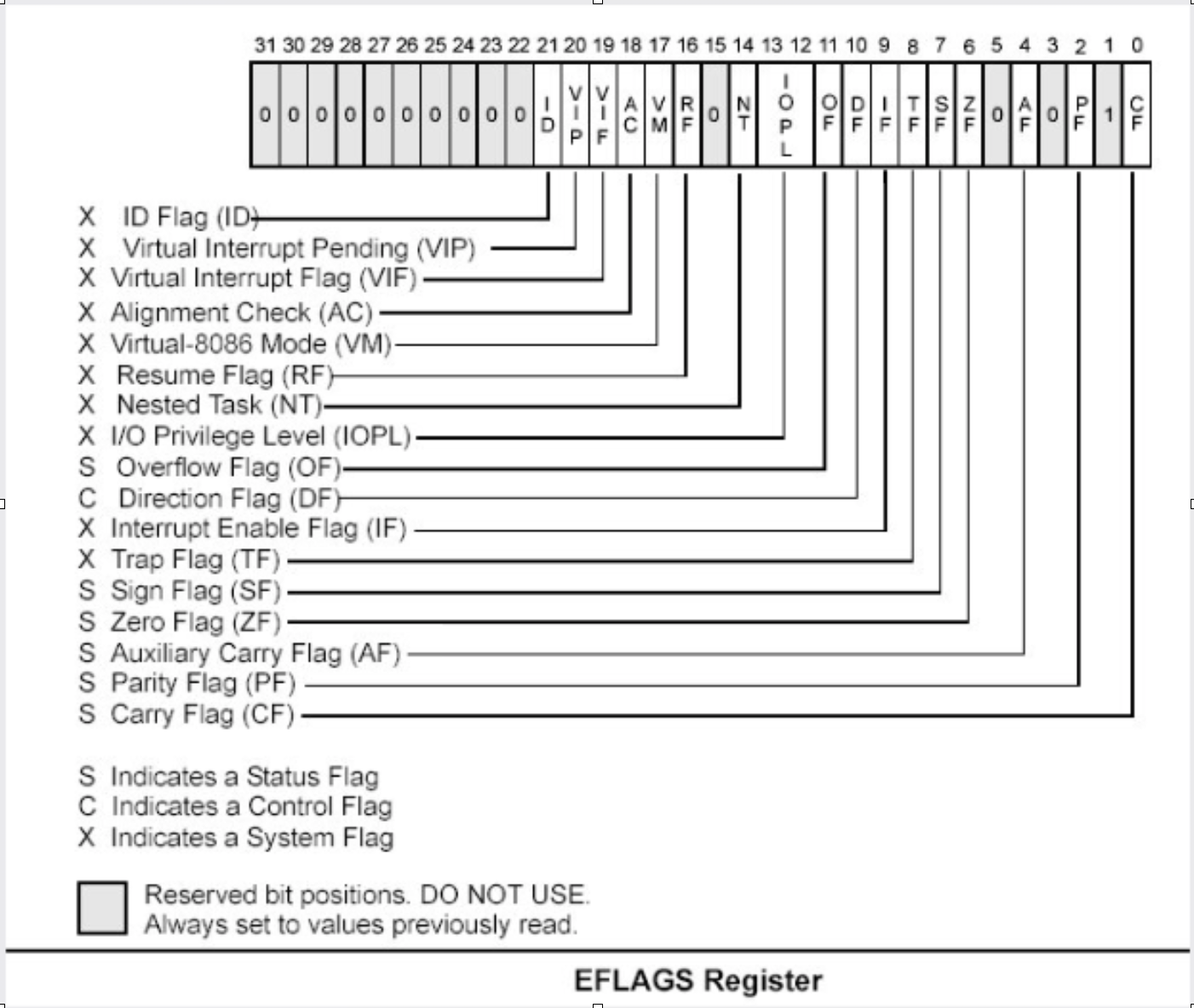
Flags We Care About Now
Zero Flag (ZF)
- Set when arithmetic or bitshift operations produce a zero
- In other words, this flag gets set if an arithmetic result is zero
Carry Flag (CF)
- Set when an arithmetic borrow or carry occurs during
add/sub- e.g. the result of anaddwould have set bit 33 (in x86), or bit 65 (in x86_64)- Also set with some bitshift operations (such as when a bit falls of the end in a
shr/shl) - This is for unsigned numbers
- Can happen when two unsigned numbers were added and the result is larger than the "capacity" of register where it is saved
- Ex: We add two 8 bit numbers and the saved result is larger than the 8 bit register we store it in
- Also set when two unsigned numbers were subtracted and we subtract the larger one from the smaller one
- Also set with some bitshift operations (such as when a bit falls of the end in a
Overflow Flag (OF)
- Indicates that sign bit of the result of an operation is different than the sign bits of the operands
- Ex: Adding two large positive numbers ends up producing a negative result (due to overflow)
- Ex: If we subtract two numbers that are smaller than register size (-129 for 8bit)
- This applies to signed numbers
Sign Flag (SF)
- Set to indicate the result of an operation is negative
Accessing the Flags
- Can be set and checked manually
- Some have special instructions for set and clear (which we'll talk about later)
- Flag register can be accessed and set manually via
pushf(d|q)/popf(d|q) - Refer to below (
pushfpopf)
pushf and popf
-
Description
- Pushes the flag register (or the first 16 bits... eflags(32 bits) or rflags(64 bits) (if
pushfdorpushfq) onto the stack, and pops the value on top of the stack into the flags register (or eflags/rflags) - Higher 32 bits in rflags are reserved
- Thus we can just handle rflags as eflags - there is no difference
- In reality, the flags we will be accessing are within the first 16 bits
- Pushes the flag register (or the first 16 bits... eflags(32 bits) or rflags(64 bits) (if
-
Basic Use
pushf       ; flags have been pushed to the stack
; ... do stuff
popf        ; flags have been restored
-
How does this really work?
- First you specify how many of the flags you want to push onto the stack (pushf)
- From there, you can pop those back off into a register (
pop reg, raxfor example) - From there you can modify the value in that register
- From there you can push that register back onto the stack (
pushf) - Finally you can pop the flag off, taking the new value with it. (
popf)
Complete Performance Lab 6
Lab 6: Flag Manipulations
- Copy the Lab6 folder (and it's contents)
- Modify the *.nasm file (Each function should have a comment block - lines starting with ';' containing instructions)
- Build and run using the following commands:
cmake . && cmake --build .
./lab6
Control Flow
Line Labels
- Global and Local
global_label:
    ; stuff
.local_label:
    ; more stuff
Everybody jmp .around
- jmp provides an unconditional branch - transfer of execution to the target
.label1:
    xor rax, rax
    inc rax
    mov rcx, rax
    jmp .label2
    mov rsp, rax        ; never gets executed
.label2:
    shl rcx, 3          ; execution continues here...
    xchg rcx, rax
    ret
call and ret
- Similar to
jmp, but with a few key differences - Functionally equivalent to:
push ripfollowed by ajmp X - Typically indicates a function call
mov rax, 1
call label1     ; push RIP, jump to label 1
jmp label2

label1:
    ror rax, 1
    ret         ; returns control returns to "jmp label2"
label2:
    ; .....
More on ret
-
Pops the return pointer off the stack and jumps to it
-
Used to return the last point of execution (as shown on previous slide)
-
Let's break this example down.

-
What's happening?
-
callpushes the return address onto the stack, this allowsretto return to that address (aka the location beforecall) -
Then call performs an unconditional jump to the location indicated by the label operand
-
At which point we preserve the current frame pointer (rbp/ebp) by pushing it
-
Then we move the current stack pointer (rsp/esp) into the now pushed frame pointer (rbp/ebp)
-
Then we perform our actions
-
Then we
ret- On return, we pop the old RBP, then
popthe ret pointer off the stack (that was placed there bycall) and jump to it's last point of execution. [Effectively - a pop rip] - In short, this pops off the return address that we stored on the stack via
call, then performs an unconditional jump to that location
- On return, we pop the old RBP, then
-
In comparison, think of it as a normal C function:
- We call that function, a stack frame is created and things are done in that function
- When all is said and done, we return the value and continue where we left off in main
- These are two different locations in the program, thus two different locations in memory
-
A Side Note About Functions
-
Typically store the stack pointer ((E|R)SP) at the top of the function
-
If stored, must be (re)stored before returning
- If we don't, our stack location will be off
- If left at the top of the stack, we will return ONTO the stack
-
This is not always done, as in FPO (Frame Pointer Optimization/Omission)
-
An example function:
myfunc:
    mov rbp, rsp
    push rbp
    ; ...
    pop rbp
    ret
Conditional Control Flow: Comparisons
cmp
-
Compares two values by subtraction (e.g.,
sub op1, op2) -
Sets flags to indicate whether the values were equal, or if one was larger
-
Flags set by this instruction: CF, OF, SF, ZF, AF and PF
-
This does not actually modify the values
-
Uses: Checking if one register is less than/equal to/greater than another reg/value
-
Example:
xor rax, rax
cmp rax, 0      ; they're equal! The ZF is now set
test
-
Compares two values by doing a bitwise
AND -
The SF, PF and ZF get set by this operation
-
Again, this does not save result anywhere
-
Often used to test whether or not a register is 0
-
Uses: Great for checking if a bit is set in a register or other comparisons needing bitwise checks
-
Example:
mov rax, 1
test rax, rax       ; the ZF is set to 0, as the result isn't 0

; ...

xor rax, rax
test rax, rax       ; the ZF is now 1
jcc
- A large set of conditional branch instructions
- Most execute based on the value of one or more flags
- Some more common jumps:
jeorjz- Jump if Equal (or Jump if Zero)jneorjnz- Jump if Not Equal (or Not Zero)ja- Jump if Above (if the operand compared previously is greater)jborjc- Jump if Below (or Jump if Carry)- Many others - refer to the Intel manual for a comprehensive list
Example 1
- A simple check to see if the result of an operation is 0:
xor rax, rax
test rax, rax
; Because the zero flag is set here, we jump to the end
jz .end
mov rsi, rax        ; not executed due to jmp
; ...
.end:
    ret
Example 2
- A simple loop:
mov rcx, 10        ; set our loop count to 10
xor rax, rax       ; set rax to 0
; This evaluates to: 10 + 9 + 8 _ ... + 1 + 0

.continue:
    add rax, rcx    ; add the current value of rcx to rax
    dec rcx         ; subtract 1 from rcx
    test rcx, rcx   ; check to see if rcx is 0
    jnz .continue   ; jump back to .continue, if rcx isn't 0

ret
loop
- A simple macro for:
decrcxtestrcx, rcxjnz
- Expects ECX/RCX to be populated with a counter variable
- The loop from the previous slide could be re-written to this:
mov rcx, 10
xor rax, rax

.continue:
    add rax, rcx
    loop .continue

ret
Complete Lab 7
Lab 7: Control Flow
Proceed to Lab 7 and follow the instructions provided in the folder. Once you have finished working on the lab you may continue to the next topic.
- You should have
git clonedthe Lab7 folder and it's contents - Modify the *.nasm file (Each function should have a comment block - lines starting with ';' containing instructions)
- Build and run using the following commands:
cmake . && cmake --build .
./lab7
String Instructions
- What a "string" means to x86(_64)
- Really just a string of bytes
- No particular qualms about terminators (e.g., '0')
- Several prefixes and a flag that will modify behavior (more on those later)
- All of them have the unit to move/copy/initialize/scan/append to the end (e.g.,
scasbvsscaswvsscads, etc.)
Common Features:
- RSI (or ESI, in x86) is treated as a pointer to the beginning of the "source"
- RDI (or EDI, in x86) is treated as a pointer to the beginning of the "destination"
- RCX (or ECX, in x86) is assumed to hold the count, if needed
- RAX (or EAX, in x86) is assumed to hold the value to evaluate, if needed (e.g., store, compare against, etc)
- Typically increments source and/or destination register pointers by the amount of data operated on (e.g.,
movsbwould add 1 to both RSI and RDI, wheremovsdwould add 4)
Common String Instructions
- Scan String --
scas(b/w/d/q)- scans a string located at RDI for value found in RAX/EAX/AX/AL (depending on size used), and increments the pointer
- Store String --
stos(b/w/d/q)- initializes the string located at RDI to the value pointed at by RAX/EAX/AX/AL (depending on size used) and increments the pointer.
- Load String --
lods(b/w/d/q)- copies the value from RSI into RAX/EAX/AX/AL, and increments the pointer
- Move String --
movs(b/w/d/q)- copies data from RSI into RDI, and increments both pointers
- Compare String --
cmps(b/w/d/q)- compares the values stored at RSI and RDI, and increments the pointer, updating the RFLAGS (or EFLAGS) register with the result
Prefixes
-
Several instruction prefixes are available to modify behavior -- looping the instruction over a section of memory
-
All of them tend to use RCX/ECX/etc as a termination condition - decrementing each instruction
-
In short, this controls how often loops repeat
-
Some prefixes available:
REP-- continue performing the action RCX timesREPNE-- continue performing the action RCX times, or until the FLAGS register indicated the operands were equal- In short, REPeat while Not Equal
REPE-- continue performing the action RCX times, or until the FLAGS register indicates the operands were not equal- In short, REPeat while Equal
-
Often used by compilers to essentially inline C string functions (such as
strlen,memset,memcpy, etc...)
Prefix Examples
- Unconditional
xor rax, rax            ; rax is now 0
mov rcx, 20             ; rcx now contains 20
mov rdi, _my_string_buf

rep stosb               ; Continue to store 0 till rcx is 0
- Conditional
xor rax, rax
mov rcx, 20
; assume the buffer below contains a string
mov rdi, _my_populated_buf

repne scasb         ; continue until we hit a NULL byte
; RCX now contains the number of bytes we scanned... in a way.
; Subtracting the original RCX against the new RCX will get you the count
The Direction Flag
- Controls the direction buffers are traversed when using the
REP* prefixes - If set during execution, an operation, ALWAYS clear after (or crashes likely to occur)
- CLD will increment lowest to highest
- STD will decrement highest to lowest
std     ; the direction flag has been set
; do stuff here
cld     ; clear the direction flag, continue operations
Complete Performance Lab 8
Lab 8: String Calls
Complete Lab 8, follow the instructions provided in the folders.
- You should have
git clonedthe Lab8 folder and it's contents - Modify the *.nasm file (Each function should have a comment block - lines starting with ';' containing instructions)
- Build and run using the following commands:
cmake . && cmake --build .
./lab8
Function Calling Conventions
Calling Conventions: x86
- Microsoft -- many calling conventions exist for x86
- Different implications for how arguments get passed
- Different implications for stack cleanup after function returns
- Name mangling is often used to differentiate
- Different than sys v (what most unix systems use)
- System V x86 Calling Convention
- Most POSIX-compliant and (POSIX-like) platforms abide by this
- Such as Linux, Solaris, BSD, OSX, etc
- Also called cdecl
- Most POSIX-compliant and (POSIX-like) platforms abide by this
- Other calling conventions
Microsoft Conventions
stdcall
- Indicated to compiler (from C) by _stdcall prefix
- Arguments pushed on the stack (in order from right to left)
- The function being called (the "callee") cleans up the space allocated
- Name gets decorated with an appended "@X", where X is the number of bytes to allocate (num args *4)
Standard call in action -- Stack Cleanup:
; Equiv: void __stdcall myfunc(int a, int b)
_myfunc@8:
    ; do stuff
    ret 8       ; we've cleaned up 8 bytes

; Equiv: int __stdcall myfunc2(int a)
_myfunc2@4:
    ; do stuff
    mov eax, 1
    ret 4
Standard call in action -- Accessing Parameters:
- If EBP hasn't been pushed to the stack:
_myfunc@8:
    mov eax, [esp + 4]      ; param 1 -above the return pointer
    mov ecx, [esp + 8]      ; param 2 -above param 1
    ; do stuff
    ret 8
- There is a difference in how things are done if EBP has been pushed to stack or not... we need to acocunt for EBP in order to not fetch return address rather than argument
_myfunc@8:
    push ebp
    mov ebp, esp
    mov eax, [ebp + 8]      ; above both the ret ptr and old ebp
    mov ecx, [ebp + 12]
    pop ebp
    ret 8
cdecl
- This is also the System V calling convention (e.g., what most non-Microsoft patforms use)
- Parameters passed in the same fashion as in stdcall
- Stack cleanup is different, the calling function (e.g., caller) is responsible for cleanup
- So just ret and if you created caller, add esp with however many bytes were passed for cleanup
- No real name mangling, aside from a leading underscore
_
; callee
_myfunc:
    push ebp
    mov ebp, esp
    ; do stuff
    pop ebp
    ret

; caller
_caller:
    ; ...
    push 2      ; arg 2
    push 1      ; arg 1
    call _myfunc
    add esp, 8  clean up
    ; ...
- Notice how we don't cleanup the callee
- We do cleanup in caller though after call
- See how the arguments are passed?
fastcall
- First two arguments (from left to right) passed via registers (ECX and EDX) automatically
- Remaining arguments pushed on the stack (right to left, as with cdecl and stcall)
- Cleanup is performed by the callee (as with stdcall)
- Name mangling is similar to stdcall, but an additional
@is prepended (e.g.,_@myfunc@8)
Other Conventions
thiscall
- "Special" convention used for C++ non-static member functions
- Defines a method of passing "this" pointer (which allows those functions access to specific instances of a class)
- Slight difference between Microsoft and System V
- Microsoft: The "this" pointer is passed ECX, other parameters work like stdcall
- System V: Works like cdecl, but the "this" pointer is the first argument to the function
- C++ name mangling is a more complex topic (and somewhat compiler dependent)
Calling Conventions: x64
- Only one convention for each (Mostly... there are oddballs like vectorcall, but we won't discuss those)
- thiscall on x64 (both conventions) passes the "this" pointer as an implicit first argument (as it does for System V x86)
- Both conventions work similarly to _fastcall, passing arguments in registers (though the registers differ between platforms)
Microsoft x64 Calling Convention
- Uses 4 registers to pass the first 4 parameters (RCX, RDX, R8, R9)
- Floating point values are passed via SIMD registers (e.g. XMM0-3)
- Remaining values are added to the stack
- Caller's responsibility to clean up (as with
_cdecl)
Shadow Space
- x64 Calling conventions require stack allocation for passed variables
- Intent is to allow function being called to immediately spill registers (if desired)
- Windows API requires space to be allocated for 4 registers (regardless of function parameter count)
- Additional arguments (beyond 4) are added via the stack
- But in the location they would normally occur at if all parameters were passed that way
- Example: param 5 would begin at [rsp + 0x20]
- Caller must create the stack allocation for passed variables
Microsoft x64 Calling Convention
- No parameters:
callee:
    ; ...
    ret

caller:
    sub rsp, 0x20       ; 8 * 4 - for register spillage
    call callee
    add rsp, 0x20       ; cleanup
- 5 or more parameters:
; caller
sub rsp, 0x28           ; space to store 5 params
mov rcx, 0x41           ; param 1 = A
mov rdx, 0x42           ; param 2 = B
mov r8, 0x43            ; param 3 = C
mov r9, 0x44            ; param 4 = D
mov [rsp + 0x20], 0x45  ; param 5 = E
call myfunc             ; callee
add rsp, 0x28           ; cleanup
- Additional reading on MS x64 calling convention:
System V x64 Calling Convention
- Similar to the Microsoft calling convention, but more values are passed via registers
- The first 6 arguments are passed via register (RDI, RSI, RDX, RCX, R8 and R9)
- Floating point arguments go in SIMD registers (XMM0-7)
- Additional arguments are pushed onto the stack
- Shadow space is not required, but the stack must remain 16-byte aligned
- Red zone optimization provides free stack space for leaf functions
Red Zone
- Allows use of the next 128 bytes below RSP without modifying stack pointer
- Further function calls WILL clobber space
- Because of this, Red Zone use is most suitable for leaf functions
- Safe from interrupt handlers, etc
- Leaf Functions are simply functions that do not call other functions
System V x64 Example
- Calling
strlen
extern strlen       ; more to come on this

; ensure NULL termination!
mystring db "this is a string", 0x00    ; more to come on this

call_strlen:
    mov rdi, mystring
    call strlen
    ret
Return Values
- Typically, the value returned at the end of the function call will be stored in RAX (for x64) or EAX (for x86)
Register Preservation
x86
- Volatile: EAX, ECX, and EDX don't need to be saved during a function call
- All others must be preserved
- What does this mean?
- Volatile registers are scratch registers and are not guaranteed to retain their values after a function call (they are presumed by the caller to be destroyed across a call)
- Nonvolatile registers are required to retain their values across a function call and must be saved by the caller if used
- This is done by the compiler automatically via a push onto the caller's stack frame to preserve non-volatile registers, unless the caller was programmer defined.
x64
-
Windows: Volatile Registers (don't need to be reserved by callee)
- RAX, RCX, RDX, R8, R9, R10 and R11
- XMMO-3 and 5
- All others need to be preserved by the callee
-
System V:
- Most registers are volatile (need to be preserved by caller if the values are to be retained)
- Exception: RBP, RBX and R12-15 are non-volatile (must be preserved by callee)
-
It is important to know when and how to preserve registers when building callers and callees.
Additional Links
Lab 9 - Windows Functions Lab
Lab 9 - Calling Conventions
Complete Lab 9, follow the instructions provided in the folders.
- You should have
git clonedthe Lab9 folder and it's contents - Modify the *.nasm file (Each function should have a comment block - lines starting with ';' containing instructions)
- Build and run using the following commands:
cmake . && cmake --build .
./lab9
End of Assembly
Chapter 4: System calls in assembly
Objectives:
- Describe how to invoke system calls in Assembly
- Describe the purpose and how to use common system interrupts in Assembly
- Use interrupts to execute OS system calls
- Invoke system calls
- Differentiate between real and protected mode
Lesson Objectives:
-
LO 1 Understand the purpose of system calls and interrupts (Proficiency Level: B)
- MSB 1.1 Implement system calls and interrupts (Proficiency Level: 2)
-
LO 2 Understand and access different processor modes in Assembly (Proficiency Level: B)
- MSB 2.1 Write Assembly code for different processor modes (Proficiency Level: 2)
-
LO 3 Access files in Assembly (Proficiency Level: B)
- MSB 3.1 Implement file handling in Assembly (Proficiency Level: 2)
-
LO 4 Explain Assembly debugging using WinDBG (Proficiency Level: B)
Performance Objectives (Proficiency Level: 3c)
-
Conditions: Given access to (references, tools, etc.):
- Access to specified remote virtual environment
- Student Guide and Lab Guide
- Student Notes
-
Performance/Behavior Tasks:
-
Standard(s)
- Criteria: Demonstration: Correctable to 100% in class
- Evaluation: Students will have 4 hours to complete the timed evaluation consisting of both cognitive and performance components.
- Minimum passing score is 80%
Advanced Assembly Topics
- System Calls
- CPU Modes and Memory Management
- Kernel vs User space
- Von Neumann vs Harvard
- File Access
- Windows Topics
System Calls
A system call is a request to the working kernel. In Linux (namely 32 bit), a system call is executed when a call is made to the kernel with the int 0x80 instruction - which can also be similarly invoked through syscall (in a 32 bit Linux context) and sysenter (in a 64 bit Linux context).
Differences among syscall, sysenter, and int 0x80 are described here.
For information about syscalls in Linux, both man syscall and man syscalls provide information. Moreover,
cat /usr/include/asm/unistd_32.h and cat /usr/include/asm/unistd_64.h will list available syscalls.
A list of Linux System Calls is available here
A typical "Hello World" program illustrates the use of a syscall in Assembly.
section .text
        global  _start          ;so the linker will point to it


_start:
                                ;write msg to stdout
    mov     edx,len             ;third argument: message length
    mov     ecx,msg             ;second argument: message
    mov     ebx,1               ;first argument: file handle (stdout)
    mov     eax,4               ;system call number (sys_write)
    int     0x80                ;call kernel

                                ;exit
  	mov     ebx,0               ;first syscall argument: exit code
    mov     eax,1               ;system call number (sys_exit)
    int     0x80                ;call kernel

section .data
    msg db      "Groovy!",0xa ; the string to write
    len equ     $ - msg             ;length of msg
This translates to saving values to 32 bit registers (eax, ebx, ecx, edc) and invoking a system interrupt int 0x80 (also int 80h).
message length → edx
message → ecx
specify stdout → ebx
system call number (write) → eax
Then the kernel is called to execute the command as spelled out in the registers.
| register: | eax | ebx | ecx | edx |
|---|---|---|---|---|
| value: | 4 | 1 | Groovy! | 8 |
| purpose: | syscall to write | specifies stdout | The string to write | length of the string + new line |
| in code: | eax, 4 | ebx, 1 | ecx, msg | edx,len |
After the message is printed via stdout, a similar process happens to exit peacefully Linux style i.e. with exit code '0'.
| register: | eax | ebx | ecx | edx |
|---|---|---|---|---|
| value: | 1 | 0 | N/A | N/A |
| purpose: | syscall to exit | specifies exit code of '0' | N/A | N/A |
| in code: | eax, 1 | ebx, 0 | N/A | N/A |
To run the above code example, you will need to compile - i.e. using nasm
nasm -f elf64 -F dwarf -g hi.asm
[This generates debugging symbols.]
Then link the resulting object file:
ld -o hi hi.o
Run the file using:
./hi
Notice, you did not have to add execute permissions.
For more practice with system calls in Assembly, see here.
CPU Modes for IA-32
Historical differences between Von Neumann and Harvard Architecture.
Current understanding of Kernel vs User land.
- Real Mode
In real mode, basically any memory address can be accessed. This is necessary for boot loading and starting a kernel, but a very dangerous proposition for a running system. Memory access is limited to 1 MB.
Real mode is seen at power up or reset. There is no memory protection - outside of real mode the system differentiates between Kernel and User space.
More information about real mode can be found here and here.
- Protected Mode
This is the most common operating mode for x86 processors. During booting, the CPU is transitioned from real to protected mode. In protected mode, security is organized through rings that determine levels of access. Protected mode allows access of up to 4GB of memory. It is possible to reenter what is basically real mode through Virtual 8086 mode.
More information about protected mode , real mode, and virtual mode
- System Management Mode
There is also a system management mode used primarily for management tasks. This mode can also be used to circumvent system security.
File Handling
File handling in Assembly also requires making system calls, because files are handled through the kernel.
| function | system call | eax | ebx | ecx |
|---|---|---|---|---|
| read | SYS_OPEN | 5 | filename | access mode i.e. read only (0), write only (1), read + write (2) |
| write | SYS_WRITE | 4 | file descriptor | contents |
| create | SYS_CREAT | 8 | filename | permissions - e.g. 0777 |
In a typical, standalone Assembly program - there are three primary sections
.text- used for the actual code with a mention of global _start to inform the linker..bss- used for declaring variables..data- for initialized variables.
For further description on typical ASM segments / sections, see here.
The following example illustrates how to write to and then read in a file in Assembly. Notice, the permissions inform the compiler that the values are octal. Also, recall that new line characters must be manually specified.
section	.text
    global _start

_start:
   ;create the file
    mov  eax, 8
    mov  ebx, file_name
    mov  ecx, 0o660 ; file permissions - notice the octal?
    int  0x80

    mov [pointer_out], eax

   ; write to the file
    mov	edx,len
    mov	ecx, msg
    mov	ebx, [pointer_out]
    mov	eax,4            ;system call number (sys_write)
    int	0x80

   ; close the file
    mov eax, 6
    mov ebx, [pointer_out]

   ; print "File written"
    mov eax, 4
    mov ebx, 1
    mov ecx, msg_done
    mov edx, len_done
    int  0x80

   ;open the file for reading
    mov eax, 5
    mov ebx, file_name
    mov ecx, 0             ;for read only access
    mov edx, 0o600 ; read only - user
    int  0x80

    mov  [pointer_in], eax

   ;read from file
    mov eax, 3
    mov ebx, [pointer_in]
    mov ecx, file_contents
    mov edx, 26
    int 0x80

   ; close the file
    mov eax, 6
    mov ebx, [pointer_in]
    int  0x80

   ; print the file_contents
    mov eax, 4
    mov ebx, 1
    mov ecx, file_contents
    mov edx, 26
    int 0x80

    mov	eax,1             ;system call number (sys_exit)
    int	0x80              ;call kernel

section	.data
    file_name db "groovyfile.txt",0
    msg db "Grooovy", 0xA, 0xD, 0
    len equ  $-msg

    msg_done db "File written", 0xA, 0xD
    len_done equ $-msg_done

section .bss
    pointer_out resb 1
    pointer_in  resb 1
    file_contents resb  26
This example was modeled after an example here.
More explanation of file creation and file handling can be found here.
System Calls in Windows System calls in Windows are more difficult. In Linux, System Calls are basically static and never changing. In Windows, system calls change by release and are typically handled through (dll) files such as nt.dll. Some system calls for Windows have been reverse engineered - an example table can be found here.
See also: Nebbett, G. (2000). Windows NT/2000 native API reference. Sams Publishing.
Advanced Assembly Topics
- System Calls
- CPU Modes and Memory Management
- Kernel vs User space
- Von Neumann vs Harvard
- File Access
- Windows Topics
System Calls
A system call is a request to the working kernel. In Linux (namely 32 bit), a system call is executed when a call is made to the kernel with the int 0x80 instruction - which can also be similarly invoked through syscall (in a 32 bit Linux context) and sysenter (in a 64 bit Linux context).
Differences among syscall, sysenter, and int 0x80 are described here.
For information about syscalls in Linux, both man syscall and man syscalls provide information. Moreover,
cat /usr/include/asm/unistd_32.h and cat /usr/include/asm/unistd_64.h will list available syscalls.
A list of Linux System Calls is available here
A typical "Hello World" program illustrates the use of a syscall in Assembly.
section .text
        global  _start          ;so the linker will point to it


_start:
                                ;write msg to stdout
    mov     edx,len             ;third argument: message length
    mov     ecx,msg             ;second argument: message
    mov     ebx,1               ;first argument: file handle (stdout)
    mov     eax,4               ;system call number (sys_write)
    int     0x80                ;call kernel

                                ;exit
  	mov     ebx,0               ;first syscall argument: exit code
    mov     eax,1               ;system call number (sys_exit)
    int     0x80                ;call kernel

section .data
    msg db      "Groovy!",0xa ; the string to write
    len equ     $ - msg             ;length of msg
This translates to saving values to 32 bit registers (eax, ebx, ecx, edc) and invoking a system interrupt int 0x80 (also int 80h).
message length → edx
message → ecx
specify stdout → ebx
system call number (write) → eax
Then the kernel is called to execute the command as spelled out in the registers.
| register: | eax | ebx | ecx | edx |
|---|---|---|---|---|
| value: | 4 | 1 | Groovy! | 8 |
| purpose: | syscall to write | specifies stdout | The string to write | length of the string + new line |
| in code: | eax, 4 | ebx, 1 | ecx, msg | edx,len |
After the message is printed via stdout, a similar process happens to exit peacefully Linux style i.e. with exit code '0'.
| register: | eax | ebx | ecx | edx |
|---|---|---|---|---|
| value: | 1 | 0 | N/A | N/A |
| purpose: | syscall to exit | specifies exit code of '0' | N/A | N/A |
| in code: | eax, 1 | ebx, 0 | N/A | N/A |
To run the above code example, you will need to compile - i.e. using nasm
nasm -f elf64 -F dwarf -g hi.asm
[This generates debugging symbols.]
Then link the resulting object file:
ld -o hi hi.o
Run the file using:
./hi
Notice, you did not have to add execute permissions.
For more practice with system calls in Assembly, see here.
CPU Modes for IA-32
Historical differences between Von Neumann and Harvard Architecture.
Current understanding of Kernel vs User land.
- Real Mode
In real mode, basically any memory address can be accessed. This is necessary for boot loading and starting a kernel, but a very dangerous proposition for a running system. Memory access is limited to 1 MB.
Real mode is seen at power up or reset. There is no memory protection - outside of real mode the system differentiates between Kernel and User space.
More information about real mode can be found here and here.
- Protected Mode
This is the most common operating mode for x86 processors. During booting, the CPU is transitioned from real to protected mode. In protected mode, security is organized through rings that determine levels of access. Protected mode allows access of up to 4GB of memory. It is possible to reenter what is basically real mode through Virtual 8086 mode.
More information about protected mode , real mode, and virtual mode
- System Management Mode
There is also a system management mode used primarily for management tasks. This mode can also be used to circumvent system security.
File Handling
File handling in Assembly also requires making system calls, because files are handled through the kernel.
| function | system call | eax | ebx | ecx |
|---|---|---|---|---|
| read | SYS_OPEN | 5 | filename | access mode i.e. read only (0), write only (1), read + write (2) |
| write | SYS_WRITE | 4 | file descriptor | contents |
| create | SYS_CREAT | 8 | filename | permissions - e.g. 0777 |
In a typical, standalone Assembly program - there are three primary sections
.text- used for the actual code with a mention of global _start to inform the linker..bss- used for declaring variables..data- for initialized variables.
For further description on typical ASM segments / sections, see here.
The following example illustrates how to write to and then read in a file in Assembly. Notice, the permissions inform the compiler that the values are octal. Also, recall that new line characters must be manually specified.
section	.text
    global _start

_start:
   ;create the file
    mov  eax, 8
    mov  ebx, file_name
    mov  ecx, 0o660 ; file permissions - notice the octal?
    int  0x80

    mov [pointer_out], eax

   ; write to the file
    mov	edx,len
    mov	ecx, msg
    mov	ebx, [pointer_out]
    mov	eax,4            ;system call number (sys_write)
    int	0x80

   ; close the file
    mov eax, 6
    mov ebx, [pointer_out]

   ; print "File written"
    mov eax, 4
    mov ebx, 1
    mov ecx, msg_done
    mov edx, len_done
    int  0x80

   ;open the file for reading
    mov eax, 5
    mov ebx, file_name
    mov ecx, 0             ;for read only access
    mov edx, 0o600 ; read only - user
    int  0x80

    mov  [pointer_in], eax

   ;read from file
    mov eax, 3
    mov ebx, [pointer_in]
    mov ecx, file_contents
    mov edx, 26
    int 0x80

   ; close the file
    mov eax, 6
    mov ebx, [pointer_in]
    int  0x80

   ; print the file_contents
    mov eax, 4
    mov ebx, 1
    mov ecx, file_contents
    mov edx, 26
    int 0x80

    mov	eax,1             ;system call number (sys_exit)
    int	0x80              ;call kernel

section	.data
    file_name db "groovyfile.txt",0
    msg db "Grooovy", 0xA, 0xD, 0
    len equ  $-msg

    msg_done db "File written", 0xA, 0xD
    len_done equ $-msg_done

section .bss
    pointer_out resb 1
    pointer_in  resb 1
    file_contents resb  26
This example was modeled after an example here.
More explanation of file creation and file handling can be found here.
System Calls in Windows System calls in Windows are more difficult. In Linux, System Calls are basically static and never changing. In Windows, system calls change by release and are typically handled through (dll) files such as nt.dll. Some system calls for Windows have been reverse engineered - an example table can be found here.
See also: Nebbett, G. (2000). Windows NT/2000 native API reference. Sams Publishing.
Advanced Assembly Topics
- System Calls
- CPU Modes and Memory Management
- Kernel vs User space
- Von Neumann vs Harvard
- File Access
- Windows Topics
System Calls
A system call is a request to the working kernel. In Linux (namely 32 bit), a system call is executed when a call is made to the kernel with the int 0x80 instruction - which can also be similarly invoked through syscall (in a 32 bit Linux context) and sysenter (in a 64 bit Linux context).
Differences among syscall, sysenter, and int 0x80 are described here.
For information about syscalls in Linux, both man syscall and man syscalls provide information. Moreover,
cat /usr/include/asm/unistd_32.h and cat /usr/include/asm/unistd_64.h will list available syscalls.
A list of Linux System Calls is available here
A typical "Hello World" program illustrates the use of a syscall in Assembly.
section .text
        global  _start          ;so the linker will point to it


_start:
                                ;write msg to stdout
    mov     edx,len             ;third argument: message length
    mov     ecx,msg             ;second argument: message
    mov     ebx,1               ;first argument: file handle (stdout)
    mov     eax,4               ;system call number (sys_write)
    int     0x80                ;call kernel

                                ;exit
  	mov     ebx,0               ;first syscall argument: exit code
    mov     eax,1               ;system call number (sys_exit)
    int     0x80                ;call kernel

section .data
    msg db      "Groovy!",0xa ; the string to write
    len equ     $ - msg             ;length of msg
This translates to saving values to 32 bit registers (eax, ebx, ecx, edc) and invoking a system interrupt int 0x80 (also int 80h).
message length → edx
message → ecx
specify stdout → ebx
system call number (write) → eax
Then the kernel is called to execute the command as spelled out in the registers.
| register: | eax | ebx | ecx | edx |
|---|---|---|---|---|
| value: | 4 | 1 | Groovy! | 8 |
| purpose: | syscall to write | specifies stdout | The string to write | length of the string + new line |
| in code: | eax, 4 | ebx, 1 | ecx, msg | edx,len |
After the message is printed via stdout, a similar process happens to exit peacefully Linux style i.e. with exit code '0'.
| register: | eax | ebx | ecx | edx |
|---|---|---|---|---|
| value: | 1 | 0 | N/A | N/A |
| purpose: | syscall to exit | specifies exit code of '0' | N/A | N/A |
| in code: | eax, 1 | ebx, 0 | N/A | N/A |
To run the above code example, you will need to compile - i.e. using nasm
nasm -f elf64 -F dwarf -g hi.asm
[This generates debugging symbols.]
Then link the resulting object file:
ld -o hi hi.o
Run the file using:
./hi
Notice, you did not have to add execute permissions.
For more practice with system calls in Assembly, see here.
CPU Modes for IA-32
Historical differences between Von Neumann and Harvard Architecture.
Current understanding of Kernel vs User land.
- Real Mode
In real mode, basically any memory address can be accessed. This is necessary for boot loading and starting a kernel, but a very dangerous proposition for a running system. Memory access is limited to 1 MB.
Real mode is seen at power up or reset. There is no memory protection - outside of real mode the system differentiates between Kernel and User space.
More information about real mode can be found here and here.
- Protected Mode
This is the most common operating mode for x86 processors. During booting, the CPU is transitioned from real to protected mode. In protected mode, security is organized through rings that determine levels of access. Protected mode allows access of up to 4GB of memory. It is possible to reenter what is basically real mode through Virtual 8086 mode.
More information about protected mode , real mode, and virtual mode
- System Management Mode
There is also a system management mode used primarily for management tasks. This mode can also be used to circumvent system security.
File Handling
File handling in Assembly also requires making system calls, because files are handled through the kernel.
| function | system call | eax | ebx | ecx |
|---|---|---|---|---|
| read | SYS_OPEN | 5 | filename | access mode i.e. read only (0), write only (1), read + write (2) |
| write | SYS_WRITE | 4 | file descriptor | contents |
| create | SYS_CREAT | 8 | filename | permissions - e.g. 0777 |
In a typical, standalone Assembly program - there are three primary sections
.text- used for the actual code with a mention of global _start to inform the linker..bss- used for declaring variables..data- for initialized variables.
For further description on typical ASM segments / sections, see here.
The following example illustrates how to write to and then read in a file in Assembly. Notice, the permissions inform the compiler that the values are octal. Also, recall that new line characters must be manually specified.
section	.text
    global _start

_start:
   ;create the file
    mov  eax, 8
    mov  ebx, file_name
    mov  ecx, 0o660 ; file permissions - notice the octal?
    int  0x80

    mov [pointer_out], eax

   ; write to the file
    mov	edx,len
    mov	ecx, msg
    mov	ebx, [pointer_out]
    mov	eax,4            ;system call number (sys_write)
    int	0x80

   ; close the file
    mov eax, 6
    mov ebx, [pointer_out]

   ; print "File written"
    mov eax, 4
    mov ebx, 1
    mov ecx, msg_done
    mov edx, len_done
    int  0x80

   ;open the file for reading
    mov eax, 5
    mov ebx, file_name
    mov ecx, 0             ;for read only access
    mov edx, 0o600 ; read only - user
    int  0x80

    mov  [pointer_in], eax

   ;read from file
    mov eax, 3
    mov ebx, [pointer_in]
    mov ecx, file_contents
    mov edx, 26
    int 0x80

   ; close the file
    mov eax, 6
    mov ebx, [pointer_in]
    int  0x80

   ; print the file_contents
    mov eax, 4
    mov ebx, 1
    mov ecx, file_contents
    mov edx, 26
    int 0x80

    mov	eax,1             ;system call number (sys_exit)
    int	0x80              ;call kernel

section	.data
    file_name db "groovyfile.txt",0
    msg db "Grooovy", 0xA, 0xD, 0
    len equ  $-msg

    msg_done db "File written", 0xA, 0xD
    len_done equ $-msg_done

section .bss
    pointer_out resb 1
    pointer_in  resb 1
    file_contents resb  26
This example was modeled after an example here.
More explanation of file creation and file handling can be found here.
System Calls in Windows System calls in Windows are more difficult. In Linux, System Calls are basically static and never changing. In Windows, system calls change by release and are typically handled through (dll) files such as nt.dll. Some system calls for Windows have been reverse engineered - an example table can be found here.
See also: Nebbett, G. (2000). Windows NT/2000 native API reference. Sams Publishing.
assembly - Intro_to_ASM - Part I
KSATs: K0201, K0202, K0207, K0209, K0210, K0213, K0214, K0215, K0216, K0217, K0219, K0221, K0222, K0223, K0224, K0225, K0226, K0308, K0315, K0763, K0767, K0769, K0771, S0114, S0125, S0130, S0134, S0143
Measurement: Written, Performance
Lecture Time: 1 Hour 30 Minutes
Demo/Performance Time: 1 Hour
Instructional Methods: Informal Lecture & Demonstration/Performance
Multiple Instructor Requirements: 1:8 for Labs
Classification: UNCLASSIFIED
Lesson Objectives:
-
LO 1 Review computer fundamentals necessary to contextualize Assembly. (Proficiency Level: B)
- MSB 1.1 Describe the specifics of x86 architecture. (Proficiency Level: B)
- MSB 1.2 Describe the specifics of x86_64 architecture. (Proficiency Level: B)
- MSB 1.3 Differentiate data sizes and their prefixes in computer soft- and hard-ware (Proficiency Level: B)
-
LO 2 Understand underlying structure and methodology for working with Assembly. (Proficiency Level: B)
- MSB 2.1 Identify an operand as part of an instruction in Assembly (Proficiency Level: B)
- MSB 2.2 Understand the purpose of an assembler (Proficiency Level: B)
- MSB 2.3 Understand the implications of the term 'endianness' to data (Proficiency Level: B)
- MSB 2.4 Identify and describe 64 bit registers (Proficiency Level: B)
- MSB 2.5 Identify and describe 32 bit registers (Proficiency Level: B)
- MSB 2.6 Identify and describe the lower 16 bit registers (Proficiency Level: B)
- MSB 2.7 Identify and describe the 'high' 8-bit registers (Proficiency Level: B)
- MSB 2.8 Identify and describe the 'low' 8-bit registers (Proficiency Level: B)
- MSB 2.9 With required resources, describe the purpose and use of the NASM assembler (Proficiency Level: B)
- MSB 2.10 Understand the implementation of opcodes in Assembly (Proficiency Level: B)
- MSB 2.11 Understand how the assembler works (Proficiency Level: B)
- MSB 2.12 Identify differences across assemblers (Proficiency Level: B)
-
LO 3 Differentiate data types and registers in Assembly. (Proficiency Level: B)
- MSB 3.1 Identify the purpose of movzx in Assembly. (Proficiency Level: B)
- MSB 3.2 Identify the purpose of xchg in Assembly. (Proficiency Level: B)
- MSB 3.3 Identify unique characteristics of registers in Assembly. (Proficiency Level: B)
- MSB 3.4 Identify different data types in Assembly. (Proficiency Level: B)
-
LO 4 Describe Advanced Data Type use in Assembly (Proficiency Level: B)
- MSB 4.1 Understand the purpose of 'structure' in Assembly' (Proficiency Level: B)
- MSB 4.2 Understand iteration of consecutive memory addresses in Assembly, i.e, how to iterate through an array (Proficiency Level: B)
Performance Objectives (Proficiency Level: 3c)
-
Conditions: Given access to (references, tools, etc.):
- Access to specified remote virtual environment
- Student Guide and Lab Guide
- Student Notes
-
Performance/Behavior Tasks:
- Write programs to move, replace, and swap values in registers using Assembly.
- Write programs partially copying data - leveraging and adapting across registers of different sizes.
- Identify and access different registers appropriately in Assembly.
-
Standard(s)
- Criteria: Demonstration: Correctable to 100% in class
- Evaluation: Students will have 4 hours to complete the timed evaluation consisting of both cognitive and performance components.
- Minimum passing score is 80%
References
- http://www.c-jump.com/CIS77/ASM/DataTypes/lecture.html
- https://courses.cs.washington.edu/courses/cse351/13su/lectures/12-structs.pdf
- https://en.wikibooks.org/wiki/X86_Assembly/X86_Architecture
- https://stackoverflow.com/questions/43562980/swapping-two-int-pointers-in-assembly-x86
- https://unix.stackexchange.com/questions/297982/how-to-step-into-step-over-and-step-out-with-gdb
- https://www.csee.umbc.edu/courses/undergraduate/313/spring05/burt_katz/lectures/Lect10/structuresInAsm.html
- https://www.geeksforgeeks.org/assembly-language-program-find-largest-number-array/
- https://www.gnu-pascal.de/gpc/Endianness.html
- https://www.tutorialspoint.com/assembly_programming/assembly_registers.htm
- https://www.tutorialspoint.com/assembly_programming/assembly_variables.htm
assembly - ASM_basic_ops - Part I
KSATs: K0203, K0211, K0220, K0230, K0235, K0778, K0779, K0780, K0781, K0782, K0783, K0784, K0785, K0786, K0787, K0788, K0789, K0790, K0791, K0798, K0809, K0817, S0115, S0123, S0126, S0139, S0157
Measurement: Written, Performance
Lecture Time: 1 Hour
Demo/Performance Time: 1 Hour
Instructional Methods: Informal Lecture & Demonstration/Performance
Multiple Instructor Requirements: 1:8 for Labs
Classification: UNCLASSIFIED
Lesson Objectives:
-
LO 1 Recognize methods in Assembly for using the stack (Proficiency Level: B)
- MSB 1.1 Understand how to use the stack (Proficiency Level: B)
- MSB 1.2 push and pop to the stack in Assembly (Proficiency Level: B)
-
LO 2 Identify, differentiate, and leverage arithmetic functions in Assembly. (Proficiency Level: B)
- MSB 2.1 Identify how to add and subtract in Assembly. (Proficiency Level: B)
- MSB 2.2 Articulate the procedures and registers for multiplication and division in Assembly. (Proficiency Level: B)
- MSB 2.3 Identify how to increment and decrement registers in Assembly. (Proficiency Level: B)
-
LO 3 Differentiate methods and purposes for bitwise shifts in Assembly. (Proficiency Level: B)
- MSB 3.1 Understand the purpose of the scas instruction. (Proficiency Level: B)
Performance Objectives (Proficiency Level: 3c)
-
Conditions: Given access to (references, tools, etc.):
- Access to specified remote virtual environment
- Student Guide and Lab Guide
- Student Notes
-
Performance/Behavior Tasks:
- Apply knowledge of the stack through commands in Assembly
-
Standard(s)
- Criteria: Demonstration: Correctable to 100% in class
- Evaluation: Students will have 4 hours to complete the timed evaluation consisting of both cognitive and performance components.
- Minimum passing score is 80%
References
- http://www.cs.tau.ac.il/~maon/teaching/2014-2015/seminar/seminar1415a-lec6-runtime.pdf
- https://blog.holbertonschool.com/hack-virtual-memory-stack-registers-assembly-code/
- https://c9x.me/x86/html/file_module_x86_id_72.html
- https://eli.thegreenplace.net/2011/09/06/stack-frame-layout-on-x86-64/
- https://learn.adacore.com/labs/bug-free-coding/chapters/stack.html
- https://stackoverflow.com/questions/46790666/how-is-stack-memory-allocated-when-using-push-or-sub-x86-instructions
- https://www.amd.com/system/files/TechDocs/24594.pdf
- https://www.cs.uaf.edu/2012/fall/cs301/lecture/09_21_stack.html
- https://www.felixcloutier.com/x86/div
- https://www.tutorialspoint.com/assembly_programming/assembly_arithmetic_instructions.htm
- https://www.tutorialspoint.com/operating_system/os_processes.htm
assembly - ASM_Control_flow - Part I
KSATs: K0218, K0232, K0233, K0236, K0237, K0238, K0239, K0252, K0253, K0254, K0255, K0774, K0775, K0794, K0795, K0796, K0797, K0798, K0799, K0800, K0801, K0802, K0811, K0812, K0813, K0815, S0117, S0118, S0119, S0121, S0123, S0125, S0128, S0129, S0134, S0138, S0177
Measurement: Written, Performance
Lecture Time: 15 Minutes
Demo/Performance Time: 45 Minutes
Instructional Methods: Informal Lecture & Demonstration/Performance
Multiple Instructor Requirements: 1:8 for Labs
Classification: UNCLASSIFIED
Lesson Objectives:
-
LO 1 Understand and utilize flags in Assembly to solve relevant problems. (Proficiency Level: B)
- MSB 1.1 Set flags via arithmetic and manually in Assembly. (Proficiency Level: B)
-
LO 2 Understand and utilize flags in Assembly to solve relevant problems. (Proficiency Level: B)
- MSB 2.1 Set flags via arithmetic and manually in Assembly. (Proficiency Level: B)
-
LO 3 Identify, differentiate, and leverage string functions in Assembly. (Proficiency Level: B)
- MSB 3.1 Understand the purpose of the scas instruction. (Proficiency Level: B)
- MSB 3.2 Understand the purpose of the stos instruction. (Proficiency Level: B)
- MSB 3.3 Understand the purpose of the lods instruction. (Proficiency Level: B)
- MSB 3.4 Understand the purpose of the movs instruction. (Proficiency Level: B)
- MSB 3.5 Understand the purpose of the cmps instruction. (Proficiency Level: B)
-
LO 4 Differentiate and implement conditional and unconditional control flow in Assembly. (Proficiency Level: B)
- MSB 4.1 Understand the purpose of the cmp instruction. (Proficiency Level: B)
- MSB 4.2 Understand the purpose of the test instruction. (Proficiency Level: B)
- MSB 4.3 Understand the purpose of the jcc and other conditional jump instructions. (Proficiency Level: B)
- MSB 4.4 Understand the purpose of the loop instruction. (Proficiency Level: B)
- MSB 4.5 Understand the purpose of the cmp instruction. (Proficiency Level: B)
-
LO 5 Differentiate function call syntaxes and accompanying registers across OSes and architectures (Proficiency Level: B)
- MSB 5.1 Differentiate register use by architecture and OS (Proficiency Level: B)
- MSB 5.2 Identify the function and use of name mangling by OS (Proficiency Level: B)
Performance Objectives (Proficiency Level: 3c)
-
Conditions: Given access to (references, tools, etc.):
- Access to specified remote virtual environment
- Student Guide and Lab Guide
- Student Notes
-
Performance/Behavior Tasks:
- Utilize common string instructions in Assembly.
- Leverage conditional branching to solve problems in Assembly.
- In Assembly, access predefined external utility functions.
- In Assembly, use name mangling to create implement functions.
-
Standard(s)
- Criteria: Demonstration: Correctable to 100% in class
- Evaluation: Students will have 4 hours to complete the timed evaluation consisting of both cognitive and performance components.
- Minimum passing score is 80%
References
- http://www.c-jump.com/CIS77/ASM/Instructions/I77_0070_eflags_bits.htm
- https://compas.cs.stonybrook.edu/~nhonarmand/courses/sp17/cse506/ref/assembly.html
- https://datacadamia.com/computer/cpu/register/eflags
- https://eli.thegreenplace.net/2011/09/06/stack-frame-layout-on-x86-64/
- https://en.wikibooks.org/wiki/X86_Assembly/Control_Flow
- https://en.wikipedia.org/wiki/FLAGS_register
- https://en.wikipedia.org/wiki/X86_calling_conventions
- https://nasm.us/doc/nasmdoc3.html
- https://revers.engineering/applied-re-accelerated-assembly-p1/
- https://security.stackexchange.com/questions/129499/what-does-eip-stand-for
- https://wiki.osdev.org/X86-64_Instruction_Encoding#Legacy_Prefixes
- https://wiki.skullsecurity.org/index.php?title=Registers#eip
- https://www.amd.com/system/files/TechDocs/24594.pdf
- https://www.felixcloutier.com/x86/scas:scasb:scasw:scasd
- https://www.intel.com/content/dam/www/public/us/en/documents/manuals/64-ia-32-architectures-software-developer-vol-1-manual.pdf
- https://www.quora.com/What-is-POPF-I-can-understand-PUSHF-cause-it-simply-push-flags-but-what-is-POPF-How-does-computer-know-what-is-flag-to-pop-1
- https://www.tutorialspoint.com/assembly_programming/assembly_registers.htm
- https://www.tutorialspoint.com/assembly_programming/assembly_scas_instruction.htm
assembly - ASM_SystemCalls - Part I
KSATs: K0152, K0241, K0242, K0243, K0814, K0816, K0818, K0820, K0821, S0120, S0122, S0124, S0132
Measurement: Written, Performance
Lecture Time:
Demo/Performance Time:
Instructional Methods: Informal Lecture & Demonstration/Performance
Multiple Instructor Requirements: 1:8 for Labs
Classification: UNCLASSIFIED
Lesson Objectives:
-
LO 1 Understand the purpose of system calls and interrupts (Proficiency Level: B)
- MSB 1.1 Implement system calls and interrupts (Proficiency Level: 2)
-
LO 2 Understand and access different processor modes in Assembly (Proficiency Level: B)
- MSB 2.1 Write Assembly code for different processor modes (Proficiency Level: 2)
-
LO 3 Access files in Assembly (Proficiency Level: B)
- MSB 3.1 Implement file handling in Assembly (Proficiency Level: 2)
-
LO 4 Explain Assembly debugging using WinDBG (Proficiency Level: B)
Performance Objectives (Proficiency Level: 3c)
-
Conditions: Given access to (references, tools, etc.):
- Access to specified remote virtual environment
- Student Guide and Lab Guide
- Student Notes
-
Performance/Behavior Tasks:
-
Standard(s)
- Criteria: Demonstration: Correctable to 100% in class
- Evaluation: Students will have 4 hours to complete the timed evaluation consisting of both cognitive and performance components.
- Minimum passing score is 80%
References
- Nebbett, G. (2000). Windows NT/2000 native API reference. Sams Publishing
- http://faculty.nps.edu/cseagle/assembly/sys_call.html
- http://www.c-jump.com/CIS77/ASM/Memory/lecture.html
- https://asmtutor.com/#lesson1
- https://asmtutor.com/#lesson22
- https://blog.packagecloud.io/eng/2016/04/05/the-definitive-guide-to-linux-system-calls/
- https://en.wikibooks.org/wiki/X86_Assembly/Interfacing_with_Linux
- https://en.wikibooks.org/wiki/X86_Assembly/Interfacing_with_Linux#Via_interrupt
- https://j00ru.vexillium.org/syscalls/nt/64/
- https://resources.infosecinstitute.com/calling-ntdll-functions-directly/#gref
- https://riptutorial.com/x86/example/12672/real-mode
- https://software.intel.com/content/www/us/en/develop/articles/intel-sdm.html
- https://stackoverflow.com/questions/29440225/in-linux-x86-64-are-syscalls-and-int-0x80-related
- https://wiki.osdev.org/Protected_Mode
- https://wiki.osdev.org/Real_Mode
- https://wiki.osdev.org/Security#Rings
- https://wiki.osdev.org/System_Management_Mode
- https://wiki.osdev.org/Virtual_8086_Mode
- https://www.codeproject.com/Articles/45788/The-Real-Protected-Long-mode-assembly-tutorial-for
- https://www.cs.uaf.edu/2016/fall/cs301/lecture/11_04_syscall.html
- https://www.researchgate.net/publication/241643659_Using_CPU_System_Management_Mode_to_Circumvent_Operating_System_Security_Functions
- https://www.tutorialspoint.com/assembly_programming/assembly_basic_syntax.htm
- https://www.tutorialspoint.com/assembly_programming/assembly_file_management.htm
- https://www.tutorialspoint.com/assembly_programming/assembly_system_calls.htm