Section 1.2: Assembly Basics & Memory
Now that we understand some basic computer concepts, we can hop into Assembly with a bit more understanding of some of it's underlying concepts.
Understanding Assembly
What is assembly?
Assembly provides "instructions" (aka human-friendly) that map to opcodes. Assembly is typically very hardware-specific.
Why use assembly?
There are a number of reasons to use assembly. The most common reason is performance. Rather than letting the compiler come up with possibly long and drawn out assembly on compilation, creating the asm yourself could provide better optimization. Assembly also exposes hardware features that may not be readily available through higher level languages. Lastly, some operations are easier to express than in higher level languages such as Python or C.
Assembly Instructions and Opcodes
Operands
Assembly code typically consist of an instruction of some kind and some operands. Operands can consist of several things, such as Registers, Memory Addresses, and Immediate (literal) Values. There are also other data types and some prefixes (which modify what the instruction does).
Opcodes
Opcodes are one or more bytes that the processor decodes (and executes). Typically opcodes translate directly from assembly language instructions, thus the syntax is slightly complicated. Opcodes can be different sizes depending on the system archetype.
Instructions
- This set of instructions:
mov eax, 0x01
ret
- Becomes:
0xb8 0x01 0x00 0x00 0x00
0xc3
Assemblers and Syntax
There are a number of different assemblers to choose from. With different assemblers come different syntaxes. There are some other slight differences and quirks depending on the Assembler you choose. Here are some of the different assemblers to choose from:
- GAS: The GNU Assembler
- NASM/YASM: The Netwide Assembler/Yet Another Assembler (a rewrite of NASM)
- MASM: The Microsoft Assembler
We will be using NASM on this course which uses Intel Syntax
Syntax Differences
- Intel Syntax (Used by NASM/YASM and others):
mov eax, 0x01
- AT&T Syntax (Used by GAS and others)
movl $0x01, %eax
- Other syntaxes do exist
Byte Ordering
Byte ordering determines the order in which bytes appear in memory. In the US and much of the Western world, we are conditioned to read from left to right. However, computers can read data as specified by engineers. In our case, we are only concerned with how a computer determines the order to read bytes in memory.
-
Big Endian stores the most significant bytes (or largest) value first.
- Therefore, the memory address: 0x10203040 would appear as... 0x10 0x20 0x30 0x40
-
Little Endian on the other hand stores the least significant bytes (or smallest) first.
- For instance, the memory address: 0x10203040 would appear as... 0x40, 0x30, 0x20, 0x10
- Little Endian is what x86(_64) processors use.
- Again, the least significant byte (not bit) is what appears first.
- In memory, this address:
0xdeadbeef - Becomes:
0xefbeadde
Breakdown
|Initial:| 0xde | 0xad | 0xbe | 0xef |
|Memory:| 0xef | 0xbe | 0xad | 0xde |
Memory
When talking about memory, there are multiple types of memory components. These memory components vary in access speed. Most higher level languages (such as C or Python) abstract this concept away so that the developer is not very exposed to it. Assembly, however, gives the programmer more control although some things are still hidden on modern systems.
Memory: Fastest to Slowest
- Registers
- Cache (L1/L2/L3)
- System Memory (RAM)
- Disk (HDD/SDD/etc)
Virtual Memory
Virtual Memory is a feature of modern operating systems that add a bit of abstraction from the hardware. Most addressing deals with virtual addresses, that is to say, if we want to access an address we do so by utilizing virtual addresses. These addresses are translated (via the lookup table) to physical addresses.
**Additional Features of Virtual Memory:**
* More than one "view" of of a physical memory address can exist (in different processes). That means we can access the same physical memory address through the use of multiple virtual addresses.
* Each user mode process appears to have a full range of addressable memory and resources
* Most modern OS's support paging.
Memory: Process Memory Layout
Below is a very high level view of the Process Memory Layout:
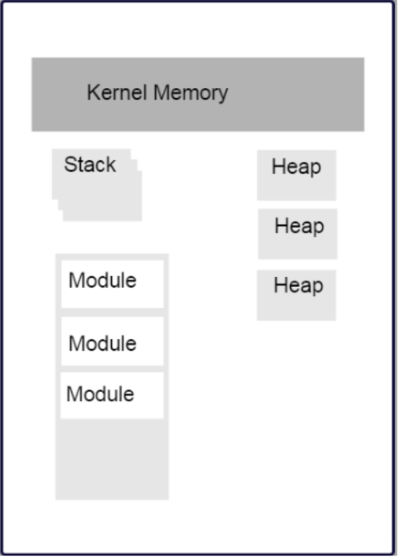
- Stack segments typically grow from high memory addresses to low.
- We will revisit the stack in the next section.
- Modules in the diagram above indicate executable files loaded into the file space. This includes:
- Glibc (specifically the .so containing the libc code)
- kernel32.dll
- Currently running executable
- There are also the HEAP sections and anonymous mappings
- Kernel Memory
- Other Items
Registers
Assembly programming gives us complete access to registers. We are also given access to special hardware instructions on the processor. Some registers are general purpose (can store any type of data) while others are more specialized. These specialized registers can contain: status codes, flags, or be associated to specific hardware. Registers are limited in number and that number depends on a number of factors to include chip and architecture.
General Purpose Registers
General Purpose Registers give us access to sub-registers. Depending on the processor, registers will have a set maximum size, different naming conventions, etc. The larger the size, the more sub-registers we have.
Namely:
- There are four main type of register sizes: 64bit/32bit/16bit/8bit.
- If you have a 64bit system, you have access to 64bit registers and their sub-registers
- The sub-registers of a 64bit system are simply: 32bit/16bit/8bit.
- The same is for any size
- If you have a 64bit system, you have access to 64bit registers and their sub-registers
- Sub-registers are NOT their own register. They simply act as a way of only modifying a certain number of bits of the total size register, depending on the processor. So if we have a 64bit CPU and access the 18bit sub-register of one of the 64bit registers, only the lower 18bits get accessed/modified. There are of course exceptions to higher/lower, etc. that we will cover later.
- Keep that in mind than when modifying a sub-register, the bits in the overarching (i.e. actual) register are modified.
- x86(_64) contains many more registers than x86. But not all of those registers have sub-registers.
x86(_64) Registers
| 64bit | 32bit | 16bit | 8bit high/low |
|---|---|---|---|
| rax | eax | ax | ah/al |
| rcx | ecx | cx | ch/cl |
| rdx | edx | dx | dh/dl |
| rdi | edi | N/A | N/A |
| rsi | esi | N/A | N/A |
- There are other registers:
- rbp/ebp: Base Pointer
- rsp/esp: Stack Pointer (More to come on both of these)
- rip/eip: Instruction Pointer (or Program Counter)
- Additional x86(_64) registers: r8-r15
Register Data and Pointers
-
General Purpose Registers can contain up to pointer-sized amounts of data (4 bytes on 32bit, 8 on 64bit)
-
They can also contain memory addresses (pointers) to blocks of data residing elsewhere in the process.
-
Addresses can be manipulated via addition, subtraction, multiplication, etc
-
Square brackets dereference (Access the data stored at the memory address)
- Example:
; a register we will be acting on whatever is directly stored in it (address or data) rax ; a register that we assume has an address to some data ; We are attempting to access that data and manipulate it [rax]- Let's look at another example:
mov rax, 0xc0ffee   ; a memory address, hopefully valid! (What happens if it's not?)
mov [rax], 100      ; now we store some data in that address

; now let's copy that address to another register
mov rcx, rax        ; Both rax and rcx point to the same location, right?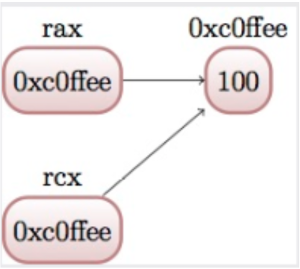
- Now let's copy the data stored at the address, and put it into RCX
mov rcx, [rcx]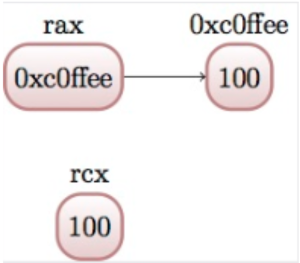
- How does this work?
- RCX is currently holding an address. To be even more specific, RCX's data is a numeric value...
- We tell the assembler that RCX's data, though numeric, represents a address and that we want to access it. That's where the dereference blocks come in [].
- The assembler then says: Okay, this is an address. Let me access it.
- After the assembler accesses it... we grab the data that's at that address and pull it out and store it back into RCX... replacing the address.
- In summary:
- [UNCHANGED] the address itself (It's no longer being pointed to by RCX though)
- [UNCHANGED] the data that's at the address (We stored 100 in there, but never acted on it since)
- [CHANGED] the value stored in RCX (to whatever data was in the address)
- What happens if you try to mov a dereferenced address value into a dereferenced address value?
Instructions
NOP
- Does nothing (Kinda sorta)
- Used for padding/alignment and timing reasons
- Idempotent instruction (does not affect anything else in the system)
- 1 byte NOP instruction translates to opcode 0x90 (more to come on this)
Memory Access
We'll begin looking at instructions to copy and access data from various locations in memory. Additionally, we will begin examining address calculation
mov instruction
- The mov instruction moves a small block of memory from a source (right hand operand) to the destination (left hand operand)
- Amount of data can be specified (will go over later)
- Basic usage:
mov rax, 0x01           ; immediate - rax is now 1
mov rax, rcx            ; register - rax is now a copy of rcx
mov rax, [rbx]          ; memory - rbx is treated as pointer, it's data is copied into rax
mov rax, qword [rbx + 8]; copying a quad word (8 bytes) into rax
- Note - these operations are described as copy
Just because the instruction is "mov", doesn't mean we are moving anything.
lea instruction
- Load Effective Address Instruction
- Calculates an address, but does not attempt to access it
- This is useful when wanting to use address calculation (ex: [rdx+4]) but not wanting to change the address
- For example:
; calculate the address by taking the address of what rdx points at, /
; and adding 8 bytes to it (perhaps indexing into an array?)
; NOTE: We are just calculating the addressees, not changing them!

lea rax, [rdx + 8]
mov rax, [rax]          ; this will access whatever was in rdx + 8

; what's different from above vs

mov rax [rdx, + 8]

; or...
add rdx, 8
mov rax, [rdx]
xchg instruction
- Exchange instruction
- Exchanges the values provided atomically.
- In other words, it SWAPS the values.
xchg rax, rcx   ; exchange two register values
; exchange a register value with a value stored in memory
xchg rax, [rcx]

; live example
mov rax, 10
mov rcx, 20

xchg rax, rcx   ; what is the value or rax and rcx now?
mov rcx, 0xdeadbeef     ; setting rcx to a address
mov [rcx], 0
xchg rax, [rcx] ; what is the value of rax and rcx now?